Chapter 01
자료구조와 알고리즘 소개
Introduction to Data Structures & Algorithms
Part 1  자료구조의 개념과 종류 · Data Structure Concepts & Types
Part 2  알고리즘 · Algorithms
Part 3  파이썬 소개와 설치 · Introduction to Python
01
Part 1
자료구조의 개념과 종류
Data Structure Concepts & Types
약 1시간 · Approx. 1 hour

IT 기본 용어 이해하기

Understanding Basic IT Terms
한국어

데이터, 정보, 지식의 차이

프로그래밍을 배우기 전에 핵심 용어부터 정리합시다.

데이터 (Data, 자료)

가공되지 않은 날것의 사실입니다. 숫자, 문자, 이미지 등 컴퓨터가 처리할 수 있는 모든 것을 말합니다.

예: "25", "서울", "37.5도", "비"

정보 (Information)

데이터를 가공·처리하여 의미를 부여한 것입니다.

예: "오늘 서울 기온 25도, 오후에 비가 올 예정"

지식 (Knowledge)

정보를 기반으로 판단·예측할 수 있는 능력입니다.

예: "비가 오니까 우산을 가져가야겠다"

데이터 (날것) 정보 (의미) 지식 (판단·예측) 가공 경험·학습
English

Difference: Data, Information, Knowledge

Let's clarify core terminology before learning programming.

Data

Raw, unprocessed facts. Numbers, text, images — anything a computer can handle.

e.g., "25", "Seoul", "37.5°C", "rain"

Information

Data that has been processed and given meaning.

e.g., "Today's Seoul temp is 25°C, rain expected in the afternoon"

Knowledge

The ability to make judgments and predictions based on information.

e.g., "It's going to rain, so I should bring an umbrella"

Data (Raw) Information (Meaning) Knowledge (Judgment) Processing Experience

자료구조란 무엇인가?

What is a Data Structure?
한국어

자료구조 = 데이터를 담는 그릇

정리되지 않은 그릇 vs 정리된 그릇

정리되지 않은 그릇(왼쪽) vs 체계적으로 정리된 그릇(오른쪽)

자료구조(Data Structure)란 데이터를 효율적으로 저장하고 관리하기 위한 구조입니다. 같은 데이터라도 어떤 그릇에 담느냐에 따라 꺼내 쓰는 속도가 달라집니다.

생활 속 비유

🏠 서랍장

양말, 속옷, 티셔츠를 한 서랍에 다 넣으면? → 찾기 어렵습니다. 종류별로 칸을 나누면? → 바로 찾을 수 있습니다!

서랍장 = 자료구조, 옷 = 데이터, 칸 나누기 = 구조화

📚 도서관

책 1만 권을 바닥에 쌓아두면? → 특정 책을 찾는 데 몇 시간이 걸립니다. 분류번호(DDC)로 정리하면? → 1분 안에 찾습니다!

도서관 분류 시스템 = 자료구조

핵심 포인트

자료구조를 잘 선택하면 프로그램의 속도와 메모리 효율이 크게 달라집니다. 이 수업에서 다양한 자료구조를 배우고, 각각 언제 사용하면 좋은지 판단하는 능력을 키울 것입니다.

English

Data Structure = Container for Data

Unorganized vs organized dishes

Unorganized dishes (left) vs systematically organized (right)

A Data Structure is a way to store and manage data efficiently. Even with the same data, how fast you can access it depends on the container you choose.

Everyday Analogies

🏠 Dresser

Throw all socks, underwear, and t-shirts in one drawer? → Hard to find anything. Separate by category? → Instant access!

Dresser = Data Structure, Clothes = Data, Organizing = Structuring

📚 Library

Pile 10,000 books on the floor? → Takes hours to find one. Organize by classification (DDC)? → Found in under a minute!

Library classification = Data Structure

Key Takeaway

Choosing the right data structure dramatically affects a program's speed and memory efficiency. In this course, you'll learn various data structures and develop the ability to judge when to use each.
왜 자료구조를 배워야 하나?

Why Learn Data Structures?
한국어

동물원 이야기로 이해하기

동물원 자료구조 비유

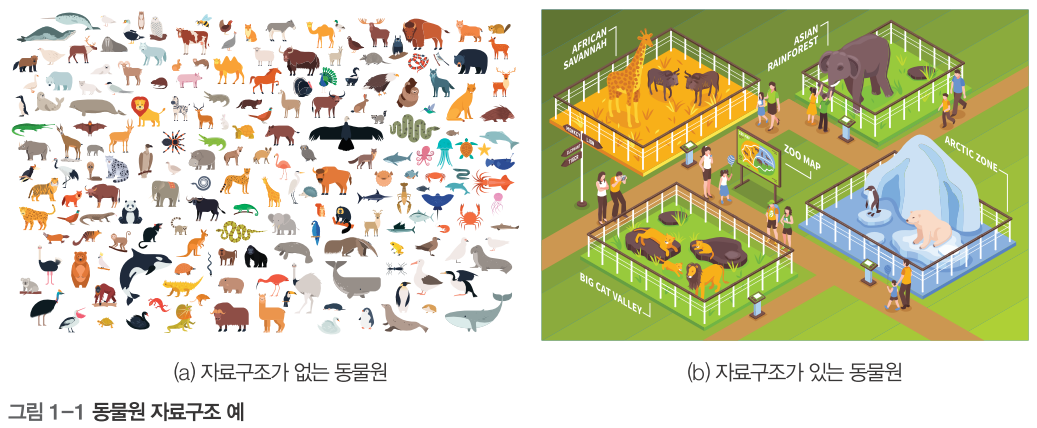
그림 1-1. (a) 자료구조가 없는 동물원 vs (b) 자료구조가 있는 동물원

동물원에 7종의 동물이 있습니다. 관리 방법에 따라 효율이 달라집니다.

나쁜 방법

7마리를 하나의 큰 우리에 넣음 → 특정 동물 찾기 어려움, 동물끼리 싸움, 관리 비효율

좋은 방법

종류별로 분리하여 관리 → 빠르게 찾기 가능, 안전하고 효율적

데이터 (자료) 자료구조 어떻게 담을지 알고리즘 어떻게 다룰지 효율적인 프로그램

자료구조 + 알고리즘 = 프로그램

좋은 자료구조를 선택하면 알고리즘이 간단해지고, 프로그램 성능도 향상됩니다. 이것이 우리가 자료구조를 배우는 이유입니다!

English

Understanding Through the Zoo Story

Zoo data structure analogy

Fig 1-1. (a) Zoo without data structure vs (b) Zoo with data structure

A zoo has 7 kinds of animals. Efficiency depends on how you manage them.

Bad Way

Put all 7 in one big enclosure → Hard to find, animals fight, inefficient

Good Way

Separate by type → Quick access, safe, efficient

Data Data Structure How to store Algorithm How to process Efficient Program

Data Structure + Algorithm = Program

Choosing a good data structure simplifies algorithms and improves performance. That's why we study data structures!

자료구조의 분류 체계

Data Structure Classification
한국어

자료구조 분류 트리

자료구조 분류

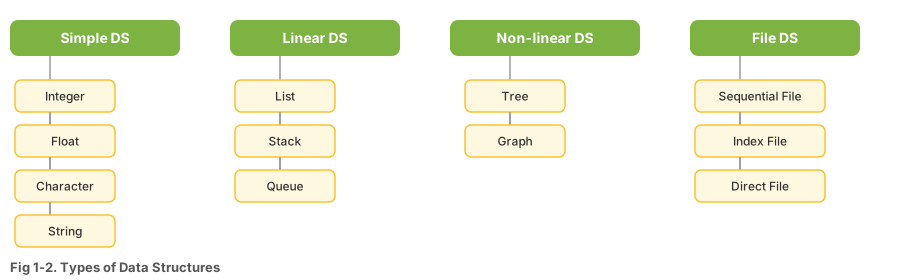
그림 1-2. 자료구조의 종류 (교재 원본)

자료구조 단순 자료구조 선형 자료구조 비선형 자료구조 정수, 실수, 문자, 문자열 리스트 연결리스트 스택 트리 그래프 이번 학기 학습 범위: 리스트(3장) → 스택(4장) → 큐(5장) → 트리(7장) → 그래프(8장)

단순 자료구조 (Simple)

프로그래밍 언어가 기본 제공하는 데이터 타입입니다. 정수(int), 실수(float), 문자(char), 문자열(string)이 있습니다. 예를 들어 나이 = 20(정수), 키 = 175.5(실수) 등이 있습니다.

선형 자료구조

데이터가 일렬로 나열된 구조. 앞뒤 관계가 1:1입니다.

비선형 자료구조

하나의 데이터가 여러 개와 연결되는 구조. 1:N 관계입니다.

English

Data Structure Classification Tree

Data Structure Classification

Fig 1-2. Types of Data Structures (English version)

Data Structures Simple Linear Non-linear int, float, char, string List Linked List Stack Queue Tree Graph This semester's coverage: List(Ch3) → Stack(Ch4) → Queue(Ch5) → Tree(Ch7) → Graph(Ch8)

Simple Data Structures

Built-in data types of a programming language: integer (int), float, character (char), string. For example: age = 20 (int), height = 175.5 (float).

Linear

Data arranged in a line. Each element has a 1:1 predecessor/successor.

Non-linear

One element connects to multiple others. 1:N relationships.

선형 자료구조 ① 리스트

Linear DS ① List
한국어

리스트(List)란?

선형 자료구조

그림 1-3. 선형 자료구조의 형태

데이터를 순서대로 나열한 자료구조입니다. 영어 단어 뜻 그대로 "목록"입니다.

생활 속 리스트

마트 쇼핑 목록을 생각하세요: 우유, 빵, 달걀, 치즈 순서대로 적습니다. 중간에 "버터"를 추가하거나, "달걀"을 지울 수도 있습니다.

선형 리스트 (배열, Array)

데이터가 메모리에 연속적으로 저장됩니다. 각 데이터는 번호(인덱스)가 있어 바로 접근 가능합니다.

인덱스: [0] [1] [2] [3] [4] 우유 달걀 치즈 버터 장점: 인덱스로 바로 접근 → 빠름!

연결 리스트 (Linked List)

데이터가 메모리 여기저기에 흩어져 있지만, 화살표(포인터)로 연결됩니다.

우유 → 빵 → 달걀 → 치즈 ×

장점: 중간 삽입/삭제가 쉬움 → 화살표만 바꾸면 됨!

English

What is a List?

Linear data structure

Fig 1-3. Form of Linear Data Structures

A data structure that arranges data in order. It literally means a "list" or "catalog."

Lists in Everyday Life

Think of a shopping list: milk, bread, eggs, cheese — written in order. You can add "butter" in between or remove "eggs."

Linear List (Array)

Data stored contiguously in memory. Each item has an index number for direct access.

Index: [0] [1] [2] [3] [4] Milk Bread Eggs Cheese Butter Advantage: Direct access by index → Fast!

Linked List

Data is scattered in memory, but connected by arrows (pointers).

Milk → Bread → Eggs → Cheese ×

Advantage: Easy insertion/deletion → just change the pointers!

선형 자료구조 ② 스택과 큐

Linear DS ② Stack & Queue
한국어

스택(Stack)이란?

영어로 "쌓다"라는 뜻입니다. 접시를 쌓아올리듯 나중에 넣은 것이 먼저 나오는 구조입니다.

생활 속 스택

  • 접시 쌓기: 맨 위에 올린 접시를 먼저 꺼냄
  • 웹 브라우저 뒤로 가기: 마지막 방문 페이지로 돌아감
  • Ctrl+Z (되돌리기): 가장 최근 작업을 취소
스택 (LIFO) Last In, First Out A (먼저 넣음) B C (나중에 넣음) ← 먼저 꺼냄! 입출구 (TOP)

큐(Queue)란?

영어로 "줄을 서다"라는 뜻입니다. 먼저 넣은 것이 먼저 나오는 구조입니다.

생활 속 큐

  • 매표소 줄: 먼저 온 사람이 먼저 표를 삼
  • 프린터 인쇄 대기: 먼저 요청한 문서부터 인쇄
  • 은행 번호표: 먼저 번호를 뽑은 사람 먼저
큐 (FIFO) — First In, First Out 나감 ← A (먼저) B C (나중) → 들어옴
English

What is a Stack?

Means "to stack." Like stacking plates — the last item in comes out first.

Stacks in Everyday Life

  • Stacking plates: Take the top plate first
  • Browser Back button: Returns to last visited page
  • Ctrl+Z (Undo): Undoes the most recent action
Stack (LIFO) Last In, First Out A (first in) B C (last in) ← first out! Entry/Exit (TOP)

What is a Queue?

Means "to line up." The first item in comes out first.

Queues in Everyday Life

  • Ticket line: First person in line buys first
  • Printer queue: First document requested prints first
  • Bank number tickets: Earliest number gets served first
Queue (FIFO) — First In, First Out Out ← A (first) B C (last) → In

비선형 자료구조: 트리와 그래프

Non-linear DS: Tree & Graph
한국어

트리(Tree)란?

비선형 자료구조

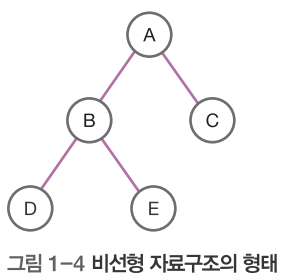
그림 1-4. 비선형 자료구조의 형태 (트리)

나무를 거꾸로 뒤집은 모양입니다. 하나의 뿌리(root)에서 시작해 가지를 치며 뻗어 나갑니다. 부모-자식 관계가 있는 계층 구조입니다.

생활 속 트리

  • 회사 조직도: 사장 → 부장 → 과장 → 사원
  • 컴퓨터 폴더 구조: C드라이브 → 문서 → 학교 → 자료구조
  • 가계도: 할아버지 → 아버지 → 나
트리 구조 (조직도 예시) 사장 부장A 부장B 사원 사원

그래프(Graph)란?

점(정점, Vertex)들이 선(간선, Edge)으로 자유롭게 연결된 구조입니다. 트리와 달리 순환(사이클)이 가능합니다.

생활 속 그래프

  • 지하철 노선도: 역(점)과 노선(선)으로 연결
  • SNS 친구 관계: 사람(점)과 친구(선)로 연결
  • 도로 지도: 도시(점)와 도로(선)로 연결
English

What is a Tree?

Non-linear data structure

Fig 1-4. Form of Non-linear Data Structures (Tree)

Shaped like an upside-down tree. It starts from a root and branches out. It's a hierarchical structure with parent-child relationships.

Trees in Everyday Life

  • Company org chart: CEO → Director → Manager → Staff
  • Computer folder structure: C: → Documents → School → DS
  • Family tree: Grandfather → Father → Me
Tree Structure (Org Chart) CEO Dir. A Dir. B Staff Staff

What is a Graph?

Points (vertices) freely connected by lines (edges). Unlike trees, cycles are possible.

Graphs in Everyday Life

  • Subway map: Stations (vertices) connected by lines (edges)
  • SNS friendships: People (vertices) linked by friendships (edges)
  • Road map: Cities (vertices) connected by roads (edges)

파일 자료구조

File Data Structures
한국어

파일에 데이터를 저장하는 3가지 방식

① 순차 파일 (Sequential File)

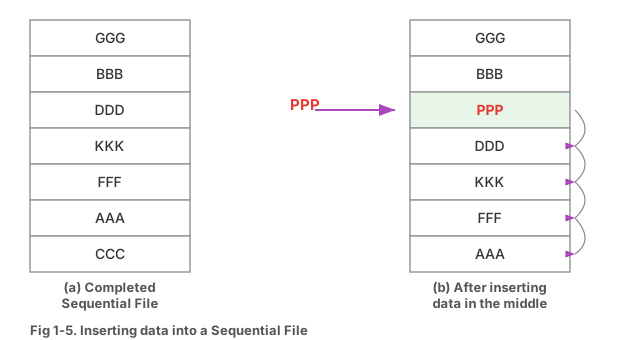
데이터를 처리 순서대로 연속 저장합니다. 공간 효율이 높지만, 중간 삽입/삭제 시 전체를 재구성해야 합니다.

순차 파일

그림 1-5. 순차 파일에서 중간에 데이터 삽입

비유: 카세트 테이프 — 처음부터 순서대로 재생해야 함

AAA BBB CCC DDD EEE

② 직접 파일 (Direct File)

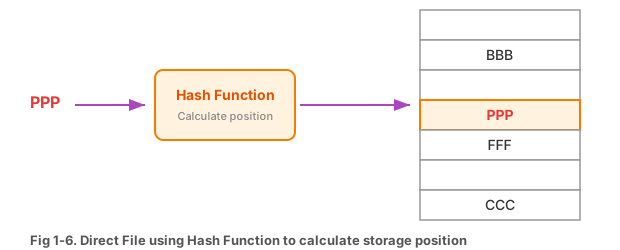
해시 함수를 사용하여 데이터의 저장 위치를 계산합니다. 바로 원하는 위치에 접근할 수 있어 검색이 매우 빠릅니다.

직접 파일

그림 1-6. 해시 함수를 이용한 직접 파일

③ 색인 순차 파일 (Indexed Sequential File)

순차 파일과 직접 파일의 장점을 결합한 구조입니다. 색인(목차)을 통해 빠르게 위치를 찾고, 그 위치부터 순차적으로 읽습니다.

비유: 사전 — 색인(ㄱ,ㄴ,ㄷ...)으로 빠르게 찾음

English

3 Ways to Store Data in Files

① Sequential File

Data stored continuously in processing order. Space-efficient, but inserting/deleting requires restructuring everything.

Sequential File

Fig 1-5. Inserting data into a Sequential File

AAA BBB CCC DDD EEE

② Direct File

Uses a hash function to calculate storage locations. Enables instant access to any position, making searches very fast.

Direct File Hash

Fig 1-6. Direct File using Hash Function

③ Indexed Sequential File

Combines advantages of sequential and direct files. Uses an index (table of contents) for quick lookup, then reads sequentially from that point.

Analogy: Dictionary — quickly find entries via the index

해시(Hash)란?

What is Hashing?
한국어

해시 함수의 개념

해시 함수 개념

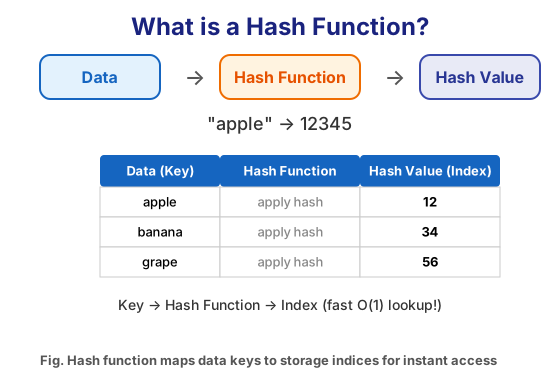
해시 함수: 데이터(Key) → 해시값(Index)

해시(Hash)란 데이터를 입력받아 고정된 크기의 값으로 변환하는 것입니다. 이 변환 규칙을 해시 함수라고 합니다.

쉬운 비유: 학번으로 사물함 배정

학번 20250101인 학생에게 사물함을 배정할 때:

해시 함수: 학번 ÷ 100의 나머지 = 사물함 번호

20250101 ÷ 100 = 나머지 1 → 1번 사물함!

20250237 ÷ 100 = 나머지 37 → 37번 사물함!

입력 데이터 해시 함수 f(x) = x % 100 저장 위치(주소) 같은 입력 → 항상 같은 출력! (결정적 함수)

해시의 활용처

  • 비밀번호 저장: 원본 대신 해시값을 저장 → 보안
  • 데이터 검색: 해시 테이블로 O(1) 검색 가능
  • 파일 무결성 검증: 다운로드 파일의 해시값 비교
English

The Concept of Hash Functions

Hash Function Concept

Hash Function: Data (Key) → Hash Value (Index)

Hashing takes input data and converts it to a fixed-size value. The conversion rule is called a hash function.

Easy Analogy: Assigning Lockers by Student ID

Assigning a locker to student ID 20250101:

Hash function: Student ID mod 100 = Locker number

20250101 mod 100 = remainder 1 → Locker #1!

20250237 mod 100 = remainder 37 → Locker #37!

Input Data Hash Function f(x) = x % 100 Storage Address Same input → Always same output! (Deterministic)

Where Hashing is Used

  • Password storage: Store hash, not original → security
  • Data search: Hash tables enable O(1) lookup
  • File integrity: Compare hash values of downloaded files

자료구조 비교 정리

Data Structure Comparison
한국어

한눈에 보는 자료구조

자료구조특징생활 비유배울 장
리스트순서대로 나열, 인덱스 접근쇼핑 목록3장
연결 리스트포인터로 연결, 삽입/삭제 유연기차 칸 연결3장
스택LIFO (후입선출)접시 쌓기4장
FIFO (선입선출)매표소 줄5장
트리계층 구조, 부모-자식조직도7장
그래프자유로운 연결, 사이클 가능지하철 노선도8장

자료구조 선택 기준

  • 데이터 접근이 빈번하면 → 리스트(배열)
  • 삽입/삭제가 빈번하면 → 연결 리스트
  • 되돌리기 기능이 필요하면 → 스택
  • 순서대로 처리해야 하면 →
  • 계층 관계를 표현하면 → 트리
  • 네트워크 관계를 표현하면 → 그래프
English

Data Structures at a Glance

StructureKey FeatureAnalogyChapter
ListOrdered, index accessShopping listCh. 3
Linked ListPointer-linked, flexible insert/deleteTrain carsCh. 3
StackLIFO (Last In, First Out)Stacking platesCh. 4
QueueFIFO (First In, First Out)Ticket lineCh. 5
TreeHierarchical, parent-childOrg chartCh. 7
GraphFree connections, cycles possibleSubway mapCh. 8

How to Choose a Data Structure

  • Frequent data access → List (Array)
  • Frequent insert/delete → Linked List
  • Need undo feature → Stack
  • Process in order → Queue
  • Represent hierarchy → Tree
  • Represent networks → Graph

Part 1 실습문제

Part 1 Practice
한국어
실습 1-1: 자료구조 분류

다음 자료구조를 선형비선형으로 분류하세요:

스택, 그래프, 큐, 트리, 연결 리스트, 선형 리스트

선형 자료구조비선형 자료구조
실습 1-2: 빈칸 채우기
  • ( ____ ) 자료구조는 LIFO 방식으로, 접시 쌓기와 비슷하다.
  • ( ____ ) 자료구조는 FIFO 방식으로, 줄 서기와 비슷하다.
  • ( ____ ) 파일은 해시 함수를 사용하여 저장 위치를 결정한다.
  • 자료구조는 "어떻게 ( ____ )", 알고리즘은 "어떻게 ( ____ )"에 관한 것이다.
실습 1-3: 생각해 보기

다음 상황에 어울리는 자료구조를 선택하고 이유를 말해 보세요:

  • 음식점 대기 손님 관리 → ( ____ )
  • 웹 브라우저 방문 기록 → ( ____ )
  • 인스타그램 팔로우 관계 → ( ____ )
English
Practice 1-1: Classify Data Structures

Classify into Linear and Non-linear:

Stack, Graph, Queue, Tree, Linked List, Linear List

LinearNon-linear
Practice 1-2: Fill in the blanks
  • ( ____ ) uses LIFO, similar to stacking plates.
  • ( ____ ) uses FIFO, similar to standing in line.
  • A ( ____ ) file uses a hash function to determine storage location.
  • DS is about "how to ( ____ )," algorithms about "how to ( ____ )."
Practice 1-3: Think About It

Choose a matching data structure and explain why:

  • Restaurant waiting list → ( ____ )
  • Web browser history → ( ____ )
  • Instagram follow relationships → ( ____ )
02
Part 2
알고리즘
Algorithms
약 1시간 · Approx. 1 hour

알고리즘이란?

What is an Algorithm?
한국어

알고리즘의 정의

어떤 문제를 해결하기 위한 단계적인 절차입니다. 정해진 입력을 받아서 원하는 출력을 만들어 내는 일련의 과정을 말합니다.

일상 속 알고리즘 예시

라면 끓이기 알고리즘:

① 물 550ml를 냄비에 넣는다 → ② 물이 끓으면 면과 스프를 넣는다 → ③ 4분 30초 기다린다 → ④ 불을 끈다 → ⑤ 완성!

ATM에서 돈 찾기 알고리즘:

① 카드 삽입 → ② 비밀번호 입력 → ③ 출금 금액 입력 → ④ 잔액 확인 → ⑤ (잔액 충분하면) 돈 출금 → ⑥ 카드 반환

좋은 알고리즘의 조건

  • 입력: 0개 이상의 입력이 있어야 한다
  • 출력: 1개 이상의 출력이 있어야 한다
  • 명확성: 각 단계가 모호하지 않아야 한다
  • 유한성: 반드시 끝나야 한다 (무한 반복 X)
  • 유효성: 실행 가능한 연산이어야 한다
English

Definition of an Algorithm

A step-by-step procedure for solving a problem. A series of operations that takes given inputs and produces desired outputs.

Everyday Algorithm Examples

Cooking ramen algorithm:

① Add 550ml water to pot → ② When boiling, add noodles and seasoning → ③ Wait 4 min 30 sec → ④ Turn off heat → ⑤ Done!

ATM withdrawal algorithm:

① Insert card → ② Enter PIN → ③ Enter amount → ④ Check balance → ⑤ (If sufficient) Dispense cash → ⑥ Return card

Properties of a Good Algorithm

  • Input: Must accept 0 or more inputs
  • Output: Must produce at least 1 output
  • Definiteness: Each step must be unambiguous
  • Finiteness: Must terminate (no infinite loops)
  • Effectiveness: Operations must be feasible

동물원 트럭 문제 (1)

Zoo Truck Problem (1)
한국어

문제 상황

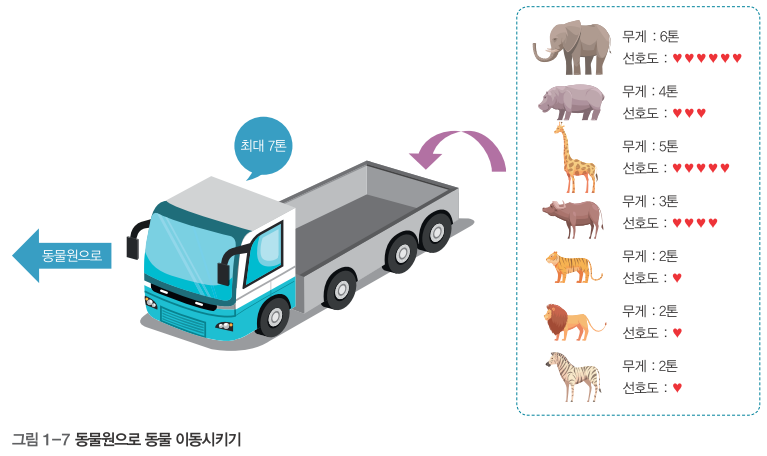
동물원 트럭 문제

그림 1-7. 동물원으로 동물 이동시키기 (최대 7톤)

동물원에 7종의 동물이 있습니다. 이 동물들을 다른 동물원으로 옮기려고 합니다. 트럭은 최대 7톤까지 실을 수 있고, 단 1회만 운송할 수 있습니다.

동물무게(톤)선호도
호랑이2.510
사자3.08
하마3.55
원숭이0.53
코끼리5.09
기린1.56
판다1.07

목표

무게 합이 7톤 이하이면서, 선호도 합이 최대가 되도록 동물을 선택하세요!

English

Problem Setup

Zoo Truck Problem

Fig 1-7. Moving animals to the zoo (max 7 tons)

A zoo has 7 animals that need to be transported. The truck can carry max 7 tons in only 1 trip.

AnimalWeight(t)Preference
Tiger2.510
Lion3.08
Hippo3.55
Monkey0.53
Elephant5.09
Giraffe1.56
Panda1.07

Goal

Select animals where total weight ≤ 7 tons and total preference is maximized!

동물원 트럭 문제 (2) — 풀이

Zoo Truck Problem (2) — Solution
한국어

접근 방법 1: 모든 조합 시도 (Brute Force)

7마리 중 가능한 모든 조합을 확인합니다. 총 경우의 수 = 2⁷ = 128가지

왜 128가지?

각 동물마다 "태우다 / 안 태우다" 2가지 선택이 있으므로, 2 × 2 × 2 × 2 × 2 × 2 × 2 = 2⁷ = 128가지입니다.

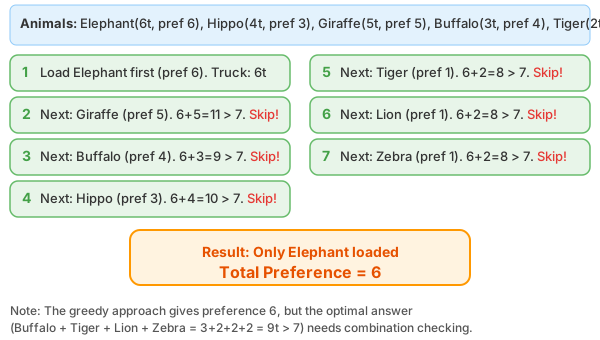
그리디 알고리즘 과정

그리디 알고리즘으로 동물 선택 과정 (교재 풀이)

접근 방법 2: 그리디(Greedy) 알고리즘

"무게 대비 선호도"가 높은 순서로 골라봅시다.

1 선호도/무게 비율 계산:
호랑이(10/2.5=4.0), 판다(7/1.0=7.0), 기린(6/1.5=4.0), 원숭이(3/0.5=6.0), 사자(8/3.0=2.7), 코끼리(9/5.0=1.8), 하마(5/3.5=1.4)
2 비율 순으로 정렬:
판다(7.0) → 원숭이(6.0) → 호랑이(4.0) → 기린(4.0) → 사자(2.7) → 코끼리(1.8) → 하마(1.4)
3 순서대로 실기:
판다(1.0t) + 원숭이(0.5t) + 호랑이(2.5t) + 기린(1.5t) = 5.5t, 선호도 합 = 26
+ 사자(3.0t) → 8.5t > 7t 초과! → 사자 제외
+ 코끼리(5.0t) → 10.5t > 7t 초과! → 코끼리 제외
최종: 판다 + 원숭이 + 호랑이 + 기린 = 선호도 26
English

Approach 1: Try All Combinations (Brute Force)

Check every possible combination of 7 animals. Total cases = 2⁷ = 128

Why 128?

Each animal has 2 choices: "load / don't load." So 2 × 2 × 2 × 2 × 2 × 2 × 2 = 2⁷ = 128 combinations.

Greedy algorithm steps

Greedy algorithm selection process (textbook approach)

Approach 2: Greedy Algorithm

Pick by highest "preference-to-weight ratio" first.

1 Calculate pref/weight ratio:
Tiger(10/2.5=4.0), Panda(7/1.0=7.0), Giraffe(6/1.5=4.0), Monkey(3/0.5=6.0), Lion(8/3.0=2.7), Elephant(9/5.0=1.8), Hippo(5/3.5=1.4)
2 Sort by ratio:
Panda(7.0) → Monkey(6.0) → Tiger(4.0) → Giraffe(4.0) → Lion(2.7) → Elephant(1.8) → Hippo(1.4)
3 Load in order:
Panda(1.0t) + Monkey(0.5t) + Tiger(2.5t) + Giraffe(1.5t) = 5.5t, Preference = 26
+ Lion(3.0t) → 8.5t > 7t! → Skip
+ Elephant(5.0t) → 10.5t > 7t! → Skip
Final: Panda + Monkey + Tiger + Giraffe = Pref 26

동물원 트럭 문제 (3) — 경우의 수

Zoo Truck Problem (3) — Combinations
한국어

조합과 순열

동물 7마리 중에서 몇 마리를 고르는 경우의 수를 수학적으로 계산해 봅시다.

조합 (Combination) — 순서 상관 없음

공식: nCr = n! / ((n-r)! × r!)

"호랑이-하마"와 "하마-호랑이"를 같은 것으로 취급

선택 수계산경우의 수
0마리7C01
1마리7C17
2마리7C221
3마리7C335
4마리7C435
5마리7C521
6마리7C67
7마리7C71

총합 = 128가지 (= 2⁷, 각 동물이 2가지 선택지를 가지므로)

순열 (Permutation) — 순서 중요

공식: nPr = n! / (n-r)!

"호랑이-하마"와 "하마-호랑이"를 다른 것으로 취급

예: 7P2 = 7 × 6 = 42가지

English

Combinations and Permutations

Let's mathematically calculate how many ways we can choose from 7 animals.

Combination — Order doesn't matter

Formula: nCr = n! / ((n-r)! × r!)

"Tiger-Hippo" and "Hippo-Tiger" are the same

ChosenFormulaCount
07C01
17C17
27C221
37C335
47C435
57C521
67C67
77C71

Total = 128 (= 2⁷, each animal has 2 choices)

Permutation — Order matters

Formula: nPr = n! / (n-r)!

"Tiger-Hippo" and "Hippo-Tiger" are different

e.g., 7P2 = 7 × 6 = 42 ways

알고리즘 표현법 ① 자연어와 순서도

Algorithm Representation ① Natural Language & Flowchart
한국어

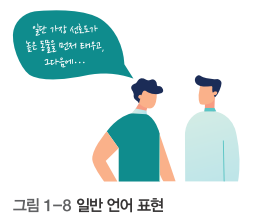
1. 자연어(일반 언어) 표현

자연어 표현

그림 1-8. 일반 언어(자연어) 표현 예시

사람이 쓰는 말과 글로 알고리즘을 설명하는 방법입니다.

예: 두 수 중 큰 수 찾기

① 두 수 A와 B를 입력받는다.
② A가 B보다 크면, A를 출력한다.
③ 그렇지 않으면, B를 출력한다.

장점: 이해하기 쉬움 / 단점: 모호할 수 있음, 코드 변환 어려움

2. 순서도 (Flowchart)

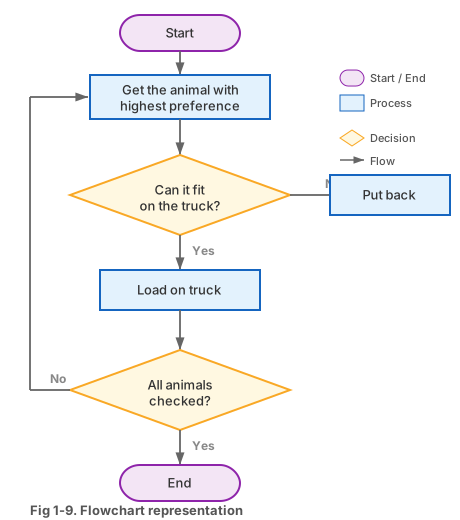
순서도

그림 1-9. 동물 트럭 문제의 순서도 표현

도형과 화살표로 알고리즘을 시각적으로 표현합니다.

도형의미설명
시작/종료둥근 사각형
처리/연산직사각형
판단/조건마름모
입출력평행사변형
흐름선화살표
시작 A, B 입력 A > B? 아니오 B 출력 A 출력 종료
English

1. Natural Language

Describing an algorithm using everyday words.

Example: Find the larger of two numbers

① Read two numbers A and B.
② If A is greater than B, output A.
③ Otherwise, output B.

Pro: Easy to understand / Con: Can be ambiguous, hard to code

2. Flowchart

Flowchart

Fig 1-9. Flowchart for zoo truck problem

Visual representation using shapes and arrows.

ShapeMeaningDescription
Start/EndRounded rectangle
ProcessRectangle
DecisionDiamond
Input/OutputParallelogram
Flow lineArrow
Start Input A, B A > B? No Print B Yes Print A End

알고리즘 표현법 ② 의사코드와 코드

Algorithm Representation ② Pseudocode & Code
한국어

3. 의사코드 (Pseudocode)

의사코드

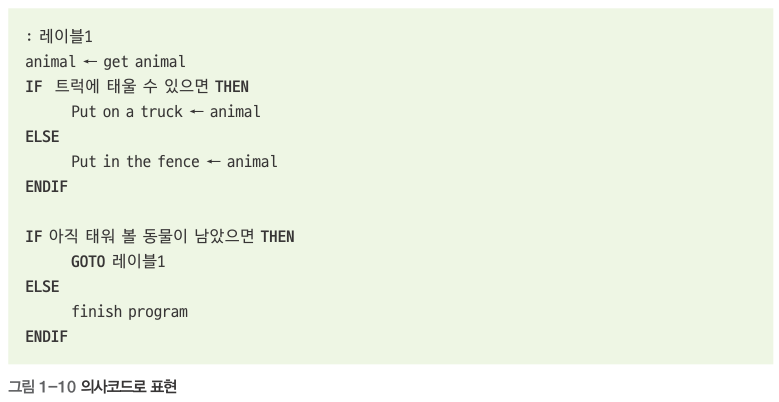
그림 1-10. 의사코드 표현 예 (교재)

프로그래밍 언어와 자연어를 섞어서 알고리즘을 표현하는 방법입니다. "가짜 코드"라는 뜻으로, 실제로 실행되지는 않지만 프로그램 구조를 명확히 보여줍니다.

// 두 수 중 큰 수 찾기 의사코드 Input: 두 수 A, B if A > B then Output A else Output B end if

장점: 코드 변환이 쉬움 / 단점: 비전공자가 읽기 어려울 수 있음

4. 프로그램 코드 (Python)

파이썬 코드

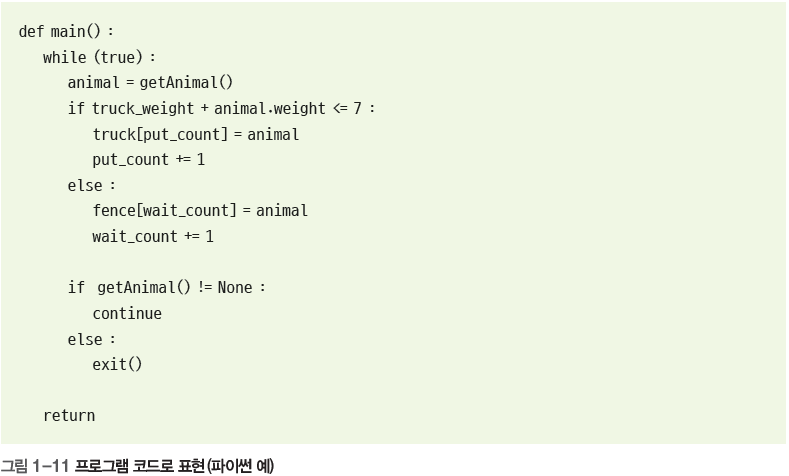
그림 1-11. 프로그램 코드(파이썬)로 표현

실제 프로그래밍 언어로 작성하여 컴퓨터가 실행할 수 있는 형태입니다.

# 두 수 중 큰 수 찾기 - 파이썬 코드 A = int(input("첫 번째 수: ")) B = int(input("두 번째 수: ")) if A > B: print(A, "이(가) 더 큽니다") else: print(B, "이(가) 더 큽니다")

4가지 표현법 정리

자연어 → 순서도 → 의사코드 → 프로그램 코드 순서로 점점 컴퓨터에 가까워집니다. 이 수업에서는 주로 의사코드와 파이썬 코드를 사용합니다.

English

3. Pseudocode

Pseudocode

Fig 1-10. Pseudocode representation (textbook)

A mix of programming language and natural language. "Pseudo" means "fake" — it doesn't run, but clearly shows program structure.

// Find larger of two numbers - pseudocode Input: two numbers A, B if A > B then Output A else Output B end if

Pro: Easy to convert to code / Con: Non-programmers may find it harder

4. Program Code (Python)

Python code

Fig 1-11. Expression in program code (Python)

Written in an actual programming language — executable by a computer.

# Find larger of two numbers - Python A = int(input("First number: ")) B = int(input("Second number: ")) if A > B: print(A, "is larger") else: print(B, "is larger")

Summary of 4 Methods

Natural Language → Flowchart → Pseudocode → Program Code — each step gets closer to the computer. In this course, we mainly use pseudocode and Python.

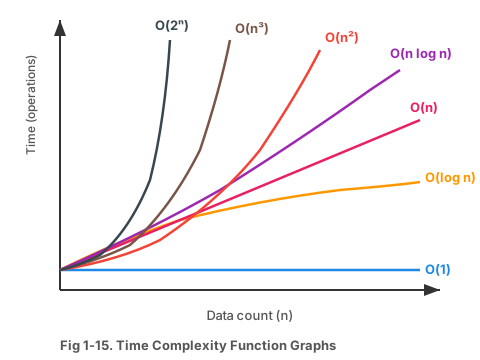
시간 복잡도란?

What is Time Complexity?
한국어

알고리즘의 성능 측정

알고리즘 비교

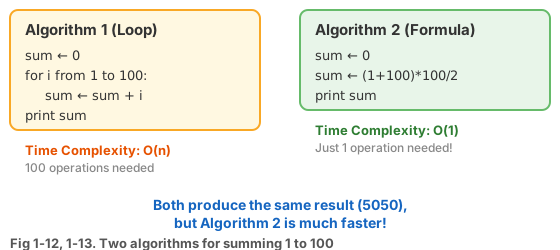
그림 1-12, 1-13. 1~100 합을 구하는 두 알고리즘 비교

같은 문제를 푸는 알고리즘이 여러 개라면, 어떤 것이 더 좋은지 비교해야 합니다. 실행 시간을 기준으로 비교하는 것을 시간 복잡도라고 합니다.

예: 100명의 학생 중 "홍길동" 찾기

방법 1: 처음부터 한 명씩 확인 → 최악 100번 확인 → O(n)

방법 2: 이름순 정렬 후 반씩 나누어 찾기 → 최악 7번 확인 → O(log n)

방법 2가 훨씬 빠릅니다! (100명 → 50명 → 25명 → ... → 1명)

왜 "시간"이 아니라 "복잡도"인가?

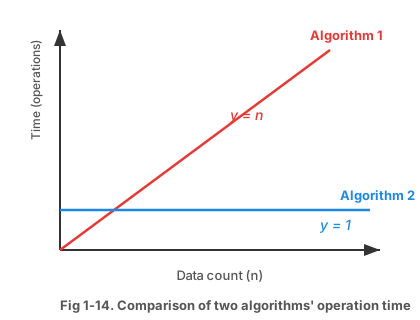
실행 시간은 컴퓨터 성능에 따라 달라지므로, 실제 시간(초) 대신 연산 횟수로 성능을 측정합니다. 데이터 개수 n에 따라 연산 횟수가 어떻게 변하는지를 표현합니다.

알고리즘 A

데이터가 늘면 시간도 비례해서 증가
→ O(n)

알고리즘 B

데이터가 늘어도 시간 동일
→ O(1)

English

Measuring Algorithm Performance

Algorithm comparison

Fig 1-12, 1-13. Two algorithms for summing 1 to 100

Time comparison

Fig 1-14. Comparison of two algorithms' operation time

When multiple algorithms solve the same problem, we need to compare them. Comparing by execution time is called time complexity.

Example: Finding "Hong Gil-dong" among 100 students

Method 1: Check one by one from start → Worst case 100 checks → O(n)

Method 2: Sort by name, then halve repeatedly → Worst case 7 checks → O(log n)

Method 2 is much faster! (100 → 50 → 25 → ... → 1)

Why "Complexity" Not "Time"?

Execution time varies with hardware, so we measure operation count instead of seconds. We express how the operation count changes as data size n grows.

Algorithm A

Time grows proportionally with data
→ O(n)

Algorithm B

Time stays constant regardless of data
→ O(1)

빅-오(Big-O) 표기법

Big-O Notation
한국어

빅-오란?

빅-오 그래프

그림 1-15. 시간 복잡도 함수의 그래프

최악의 경우를 기준으로 알고리즘 성능을 표기하는 방법입니다. "아무리 느려도 이 정도는 된다"를 보장합니다.

표기이름n=10n=100속도
O(1)상수11최고
O(log n)로그3.36.6빠름
O(n)선형10100보통
O(n log n)선형로그33664보통
O(n²)이차10010,000느림
O(2ⁿ)지수1,0241.27×10³⁰최악
성능 비교 그래프 데이터 크기 (n) 시간 O(1) O(log n) O(n) O(n²)
English

What is Big-O?

Big-O Graph

Fig 1-15. Time Complexity Function Graphs

A way to express algorithm performance based on the worst case. It guarantees "it will be at least this fast."

NotationNamen=10n=100Speed
O(1)Constant11Best
O(log n)Logarithmic3.36.6Fast
O(n)Linear10100Moderate
O(n log n)Linearithmic33664Moderate
O(n²)Quadratic10010,000Slow
O(2ⁿ)Exponential1,0241.27×10³⁰Worst
Performance Comparison Data size (n) Time O(1) O(log n) O(n) O(n²)

시간 복잡도 계산 방법

How to Calculate Time Complexity
한국어

계산 규칙

규칙 1: 상수는 무시한다

O(3n) → O(n), O(5n²) → O(n²)

이유: n이 매우 클 때 상수는 의미가 없어짐

규칙 2: 가장 큰 항만 남긴다

O(n² + n) → O(n²), O(n³ + n² + n) → O(n³)

이유: n이 커지면 가장 큰 항이 지배적

예제 1: O(1) — 상수 시간

# 배열의 첫 번째 요소 출력 data = [10, 20, 30, 40, 50] print(data[0]) # 항상 1번 실행

데이터가 5개든 100만 개든 항상 1번만 실행 → O(1)

예제 2: O(n) — 선형 시간

# 모든 요소를 한 번씩 출력 data = [10, 20, 30, 40, 50] for x in data: # n번 반복 print(x) # 1번 실행

데이터 5개면 5번, 100개면 100번 → 데이터에 비례 → O(n)

English

Calculation Rules

Rule 1: Ignore constants

O(3n) → O(n), O(5n²) → O(n²)

Why: When n is very large, constants become insignificant

Rule 2: Keep only the largest term

O(n² + n) → O(n²), O(n³ + n² + n) → O(n³)

Why: The largest term dominates as n grows

Example 1: O(1) — Constant Time

# Print first element of array data = [10, 20, 30, 40, 50] print(data[0]) # Always runs once

Whether 5 or 1,000,000 items, always runs once → O(1)

Example 2: O(n) — Linear Time

# Print every element once data = [10, 20, 30, 40, 50] for x in data: # repeats n times print(x) # runs once

5 items = 5 times, 100 items = 100 times → proportional → O(n)

시간 복잡도 계산 실전 예제

Time Complexity — More Examples
한국어

예제 3: O(n²) — 이차 시간

# 이중 반복문 — 모든 쌍 비교 data = [3, 1, 4, 1, 5] for i in data: # n번 반복 for j in data: # 각각 n번 반복 print(i, j) # 총 n × n = n² 번

데이터 5개 → 25번, 100개 → 10,000번 실행! → O(n²)

예제 4: O(log n) — 로그 시간

# 이진 탐색 — 범위를 반씩 줄임 n = 100 while n > 1: n = n // 2 # 매번 반으로 줄임 print(n) # 100→50→25→12→6→3→1 (7번)

1000이면? → 약 10번만에 끝남 → O(log n)

실전 요약

코드 패턴시간 복잡도
반복 없음 (단순 연산)O(1)
반으로 나누며 탐색O(log n)
for문 1개 (1~n)O(n)
for문 중첩 2개O(n²)
for문 중첩 3개O(n³)
English

Example 3: O(n²) — Quadratic Time

# Nested loop — compare all pairs data = [3, 1, 4, 1, 5] for i in data: # n times for j in data: # n times each print(i, j) # total n × n = n²

5 items → 25 times, 100 items → 10,000 times! → O(n²)

Example 4: O(log n) — Logarithmic Time

# Binary search — halve the range n = 100 while n > 1: n = n // 2 # halve each time print(n) # 100→50→25→12→6→3→1 (7 times)

1000? → Only about 10 steps → O(log n)

Quick Reference

Code PatternTime Complexity
No loops (simple operation)O(1)
Halving searchO(log n)
Single for loop (1~n)O(n)
Nested 2 loopsO(n²)
Nested 3 loopsO(n³)

Part 2 실습문제

Part 2 Practice
한국어
실습 2-1: 경우의 수 계산

동물원에 7종의 동물이 있습니다. 태우는 순서가 없다고 가정하면, 동물 2마리를 선택하는 경우의 수는?

힌트: 조합 공식 nCr = n! / ((n-r)! × r!)

# 7마리에서 2마리를 선택하는 조합 # 7C2 = 7! / ((7-2)! × 2!) # 답: ___가지
실습 2-2: 빅-오 정렬

다음 빅-오 표기를 빠른 순서로 정렬하세요:

O(n²), O(1), O(n), O(log n), O(2ⁿ), O(n log n)

정답: ______ → ______ → ______ → ______ → ______ → ______

실습 2-3: 시간 복잡도 분석

다음 코드의 시간 복잡도를 구하세요:

for i in range(100): print(i)

답: O( ____ )

for i in range(n): for j in range(n): print(i + j)

답: O( ____ )

실습 2-4: n=15일 때 계산

데이터 개수(n)가 15일 때, 다음을 계산하세요:

  • n² = ?
  • n × log₁₀n = ? (힌트: log₁₀15 ≈ 1.176)
English
Practice 2-1: Calculate Combinations

A zoo has 7 animals. Assuming order doesn't matter, how many ways can you choose 2?

Hint: nCr = n! / ((n-r)! × r!)

# Choosing 2 from 7 # 7C2 = 7! / ((7-2)! × 2!) # Answer: ___ ways
Practice 2-2: Sort Big-O

Sort from fastest to slowest:

O(n²), O(1), O(n), O(log n), O(2ⁿ), O(n log n)

Answer: ______ → ______ → ______ → ______ → ______ → ______

Practice 2-3: Analyze Time Complexity

Find the time complexity of each code:

for i in range(100): print(i)

Answer: O( ____ )

for i in range(n): for j in range(n): print(i + j)

Answer: O( ____ )

Practice 2-4: Calculate for n=15

When n = 15, calculate:

  • n² = ?
  • n × log₁₀n = ? (Hint: log₁₀15 ≈ 1.176)
03
Part 3
파이썬 소개와 설치
Introduction to Python & Setup
약 1시간 · Approx. 1 hour

프로그래밍 언어란?

What is a Programming Language?
한국어

컴퓨터와 대화하는 방법

사람은 한국어, 영어 등의 언어로 소통합니다. 마찬가지로 컴퓨터에게 명령을 내리려면 컴퓨터가 이해할 수 있는 언어가 필요합니다. 이것이 바로 프로그래밍 언어입니다.

비유: 외국인에게 길 알려주기

영어를 모르는 한국인이 영어만 하는 외국인에게 길을 알려주려면? → 통역사(번역기)가 필요합니다!

프로그래밍 언어 = 사람의 생각을 컴퓨터 언어(0과 1)로 번역해주는 도구

컴파일러 vs 인터프리터

컴파일러 (Compiler)

전체를 한 번에 번역 후 실행

비유: 책 전체를 번역 후 읽기

예: C, C++, Java

인터프리터 (Interpreter)

한 줄씩 번역하면서 실행

비유: 동시통역처럼 한 문장씩

예: Python, JavaScript

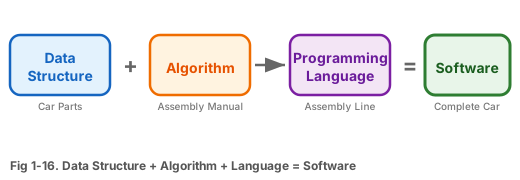
자료구조 + 알고리즘 + 프로그래밍 언어 = 소프트웨어

그림 1-16. 자료구조 + 알고리즘 + 프로그래밍 언어 = 소프트웨어

파이썬은 인터프리터 방식이므로, 코드를 한 줄 입력하면 바로 결과를 확인할 수 있습니다. 이것이 초보자에게 유리한 이유입니다!

English

How We Talk to Computers

People communicate using Korean, English, etc. Similarly, to give commands to a computer, we need a language the computer understands. That's a programming language.

Analogy: Giving Directions to a Foreigner

A Korean who doesn't speak English wants to help an English-only speaker → needs a translator!

Programming language = a tool that translates human ideas into computer language (0s and 1s)

Compiler vs Interpreter

Compiler

Translates everything at once, then runs

Analogy: Translate entire book, then read

e.g., C, C++, Java

Interpreter

Translates and runs line by line

Analogy: Simultaneous translation

e.g., Python, JavaScript

Data Structure + Algorithm + Programming Language = Software

Fig 1-16. Data Structure + Algorithm + Language = Software

Python is an interpreter language, so you can see results immediately after typing each line. That's why it's great for beginners!

파이썬(Python)이란?

What is Python?
한국어

파이썬의 탄생

파이썬 로고

Python: 배우기 쉽고 강력한 프로그래밍 언어

귀도 반 로섬(Guido van Rossum)이 C 언어로 만들어 1991년에 공식 발표한 프로그래밍 언어입니다.

이름의 유래: 영국 코미디 프로그램 "몬티 파이썬(Monty Python)"에서 따옴

파이썬의 5가지 특징

① 쉬운 문법

영어와 비슷한 직관적인 문법. 다른 언어에 비해 코드가 매우 짧습니다.

# C 언어: 5줄 이상 필요 # Python: 단 1줄! print("Hello, World!")

② 인터프리터 방식

코드를 한 줄씩 실행하여 바로 결과를 확인할 수 있습니다. 실험하며 배우기에 최적입니다.

③ 다양한 라이브러리

이미 만들어진 수천 개의 도구를 바로 가져다 쓸 수 있습니다. (NumPy, Pandas, TensorFlow 등)

④ 무료 & 오픈소스

누구나 무료로 사용할 수 있고, 전 세계 개발자가 함께 개선합니다.

⑤ 다양한 분야에서 활용

AI, 웹 개발, 데이터 분석, 자동화, 게임 등 거의 모든 분야에서 사용됩니다.

English

The Birth of Python

Python logo

Python: Easy to learn, powerful programming language

Created by Guido van Rossum in C and officially released in 1991.

Named after the British comedy show "Monty Python"

5 Key Features of Python

① Easy Syntax

Intuitive grammar similar to English. Much shorter code than other languages.

# C language: 5+ lines needed # Python: just 1 line! print("Hello, World!")

② Interpreted

Executes code line by line with instant results. Perfect for learning by experimenting.

③ Rich Libraries

Thousands of ready-to-use tools available. (NumPy, Pandas, TensorFlow, etc.)

④ Free & Open Source

Free for everyone, improved by developers worldwide.

⑤ Used Everywhere

AI, web dev, data analysis, automation, games — used in nearly every field.

파이썬의 활용 분야

Python Applications
한국어

파이썬으로 무엇을 할 수 있을까?

인공지능 (AI) / 머신러닝

ChatGPT, 이미지 인식, 음성 인식 등 AI 기술 개발에 가장 많이 사용됩니다. TensorFlow, PyTorch 등의 라이브러리를 활용합니다.

데이터 분석 / 시각화

대량의 데이터를 분석하고 그래프로 표현합니다. 기업에서 매출 분석, 트렌드 예측 등에 활용합니다.

웹 개발

Django, Flask 등의 프레임워크로 웹사이트를 만듭니다. Instagram도 파이썬(Django)으로 개발되었습니다!

업무 자동화

반복적인 엑셀 작업, 파일 정리, 이메일 발송 등을 자동화합니다. 업무 시간을 크게 절약할 수 있습니다.

게임 / 교육

Pygame으로 간단한 게임을 만들 수 있고, 프로그래밍 교육용으로 전 세계 대학에서 사용됩니다.

이 수업에서의 파이썬

우리는 파이썬을 사용하여 자료구조와 알고리즘을 직접 구현하고 테스트합니다. 파이썬의 쉬운 문법 덕분에 알고리즘 자체에 집중할 수 있습니다.

English

What Can Python Do?

AI / Machine Learning

Most popular language for AI: ChatGPT, image recognition, speech recognition. Uses TensorFlow, PyTorch, etc.

Data Analysis / Visualization

Analyze large datasets and create graphs. Used in businesses for sales analysis, trend prediction, etc.

Web Development

Build websites with Django, Flask frameworks. Instagram was built with Python (Django)!

Task Automation

Automate repetitive Excel work, file organization, email sending. Saves significant work time.

Games / Education

Create simple games with Pygame. Used for programming education at universities worldwide.

Python in This Course

We'll use Python to implement and test data structures and algorithms. Python's easy syntax lets us focus on the algorithms themselves.

파이썬 다운로드 및 설치

Download & Install Python
한국어

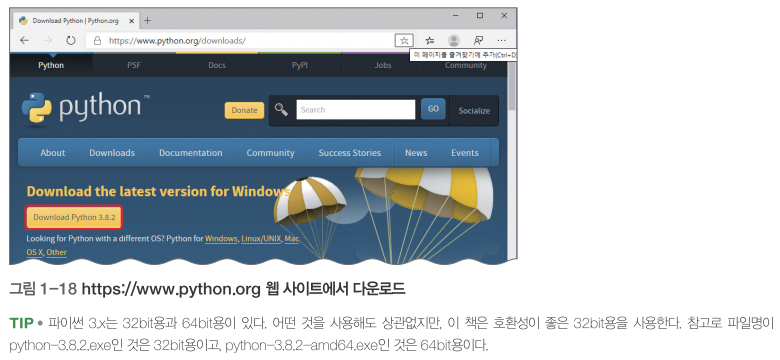
설치 과정 (4단계)

파이썬 다운로드

그림 1-18. python.org 웹사이트에서 다운로드

1 python.org 접속
웹 브라우저에서 https://www.python.org에 접속합니다.
2 Downloads 클릭
상단 메뉴의 [Downloads]를 클릭하고, 최신 버전의 Python을 다운로드합니다.
3 설치 파일 실행
다운로드한 파일을 실행합니다.

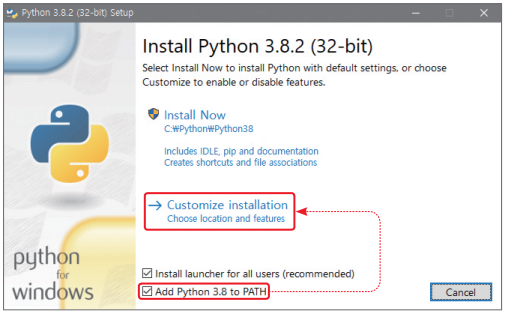
⚠ 매우 중요! PATH 설정

설치 화면 하단의 "Add Python to PATH"에 반드시 체크하세요!

체크하지 않으면 명령 프롬프트에서 Python을 실행할 수 없습니다. 체크 후 [Install Now]를 클릭합니다.

파이썬 설치

그림 1-19. 파이썬 설치 화면 (Add to PATH 체크 필수!)

4 설치 완료!
"Setup was successful" 메시지가 나타나면 [Close]를 클릭합니다.

설치 확인 방법

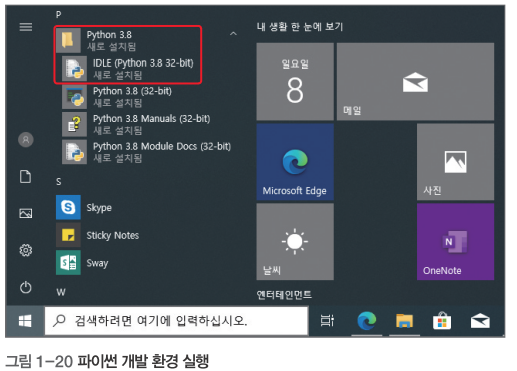
시작 메뉴에서 "IDLE"을 검색하여 실행하면 파이썬 대화형 창이 열립니다.

English

Installation Steps (4 steps)

1 Visit python.org
Open https://www.python.org in your web browser.
2 Click Downloads
Click [Downloads] in the top menu and download the latest Python version.
3 Run the Installer
Run the downloaded file.

⚠ Very Important! PATH Setting

Check "Add Python to PATH" at the bottom of the install screen!

Without it, you can't run Python from the command prompt. After checking, click [Install Now].

Python install

Fig 1-19. Python installation screen (must check Add to PATH!)

4 Done!
When "Setup was successful" appears, click [Close].

How to Verify

Search for "IDLE" in the Start menu and open it — the Python interactive shell will appear.

IDLE 사용법 — 대화형 모드

IDLE — Interactive Mode
한국어

IDLE이란?

IDLE(Integrated Development and Learning Environment)은 파이썬과 함께 설치되는 기본 개발 도구입니다. 코드를 입력하고 바로 실행 결과를 볼 수 있습니다.

대화형 모드 (Interactive Mode)

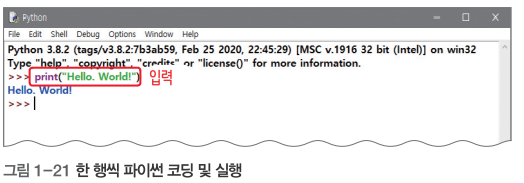
>>> 기호 뒤에 코드를 한 줄씩 입력하면 바로 결과가 나옵니다. 계산기처럼 사용할 수 있습니다!

# 간단한 계산 >>> 3 + 5 8 >>> 100 * 2 200 >>> 15 ** 2 # 15의 제곱 225 # 문자열 출력 >>> print("Hello, Python!") Hello, Python! # 변수 사용 >>> name = "홍길동" >>> print("이름:", name) 이름: 홍길동
IDLE 시작 화면

그림 1-20. IDLE 시작 화면 (대화형 모드)

IDLE 대화형 코딩

그림 1-21. IDLE에서 코드 입력 및 실행

대화형 모드의 장단점

장점: 코드를 바로 테스트 가능, 학습에 유용

단점: 코드가 저장되지 않음, 긴 프로그램에 부적합

English

What is IDLE?

IDLE (Integrated Development and Learning Environment) is a basic development tool installed with Python. Write code and see results immediately.

Interactive Mode

Type code after the >>> prompt — results appear instantly. Use it like a calculator!

# Simple calculations >>> 3 + 5 8 >>> 100 * 2 200 >>> 15 ** 2 # 15 squared 225 # Print a string >>> print("Hello, Python!") Hello, Python! # Using variables >>> name = "Gil-dong" >>> print("Name:", name) Name: Gil-dong
IDLE start screen

Fig 1-20. IDLE start screen (Interactive Mode)

IDLE interactive coding

Fig 1-21. Typing code and seeing results in IDLE

Interactive Mode Pros & Cons

Pro: Test code instantly, great for learning

Con: Code isn't saved, not ideal for long programs

IDLE 사용법 — 스크립트 모드

IDLE — Script Mode
한국어

스크립트 모드란?

여러 줄의 코드를 파일로 저장하고 한 번에 실행하는 방식입니다. 실제 프로그램을 만들 때 사용합니다.

파일 만들기 → 저장 → 실행

1 새 파일 만들기
IDLE 메뉴에서 [File] → [New File]을 클릭합니다. (단축키: Ctrl+N)
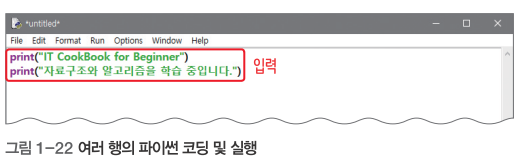
2 코드 입력
빈 편집 창에 코드를 작성합니다.
# First.py print("IT CookBook for Beginner") print("자료구조와 알고리즘을 학습 중입니다.")
3 저장하기
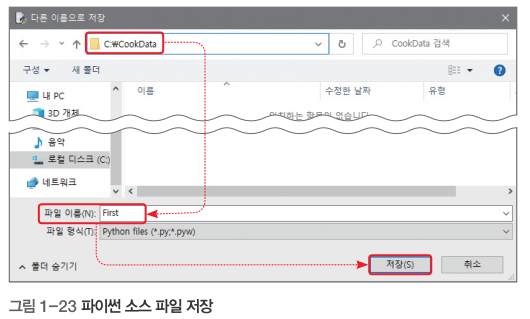
[File] → [Save As] → 파일 이름을 First.py로 저장합니다. (단축키: Ctrl+S)
4 실행하기
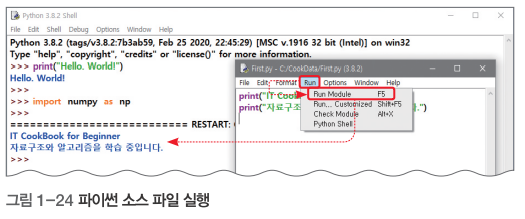
[Run] → [Run Module]을 클릭합니다. (단축키: F5)
IDLE 스크립트 모드

그림 1-22. IDLE 스크립트 모드 — 코드 작성 및 실행

실행 결과 (IDLE 셸 창에 표시)

IT CookBook for Beginner 자료구조와 알고리즘을 학습 중입니다.
English

What is Script Mode?

Save multiple lines of code as a file and run them all at once. Used for real programs.

Create → Save → Run

1 Create New File
In IDLE: [File] → [New File]. (Shortcut: Ctrl+N)
2 Write Code
Type your code in the blank editor window.
# First.py print("IT CookBook for Beginner") print("Learning Data Structures and Algorithms.")
3 Save
[File] → [Save As] → Name it First.py. (Shortcut: Ctrl+S)
4 Run
[Run] → [Run Module]. (Shortcut: F5)
IDLE Script Mode

Fig 1-22. IDLE Script Mode — writing and running code

Output (shown in IDLE shell)

IT CookBook for Beginner Learning Data Structures and Algorithms.

파이썬 기본 문법 맛보기

Python Basics Preview
한국어

변수와 출력

변수란 데이터를 저장하는 상자입니다. 이름을 붙여서 나중에 꺼내 쓸 수 있습니다.

# 변수에 값 저장 age = 20 # 정수 height = 175.5 # 실수 name = "홍길동" # 문자열 is_student = True # 참/거짓 # 출력하기 print("이름:", name) print("나이:", age, "세") print("키:", height, "cm")

기본 연산

# 산술 연산 print(10 + 3) # 덧셈: 13 print(10 - 3) # 뺄셈: 7 print(10 * 3) # 곱셈: 30 print(10 / 3) # 나눗셈: 3.333... print(10 // 3) # 몫: 3 print(10 % 3) # 나머지: 1 print(10 ** 2) # 거듭제곱: 100
파이썬 파일 저장

그림 1-23. 파이썬 파일 저장 화면

파이썬 파일 실행

그림 1-24. 파이썬 파일 실행 결과

파이썬이 C/Java와 다른 점

  • 변수 타입을 선언하지 않아도 됨 (int, float 등 자동 인식)
  • 중괄호 { } 대신 들여쓰기로 블록 구분
  • 세미콜론(;) 불필요
English

Variables and Output

A variable is a box for storing data. Give it a name to use later.

# Storing values in variables age = 20 # integer height = 175.5 # float name = "Gil-dong" # string is_student = True # boolean # Printing print("Name:", name) print("Age:", age, "years") print("Height:", height, "cm")

Basic Operations

# Arithmetic print(10 + 3) # add: 13 print(10 - 3) # sub: 7 print(10 * 3) # mul: 30 print(10 / 3) # div: 3.333... print(10 // 3) # floor div: 3 print(10 % 3) # modulo: 1 print(10 ** 2) # power: 100
Python file save

Fig 1-23. Saving a Python file

Python file run

Fig 1-24. Running a Python file and output

How Python Differs from C/Java

  • No type declarations needed (auto-detected)
  • Indentation instead of curly braces { }
  • No semicolons (;) required

파이썬 입력과 조건문

Python Input & Conditionals
한국어

사용자 입력 받기

input() 함수를 사용하면 키보드로 값을 입력받을 수 있습니다.

# 이름 입력받기 name = input("이름을 입력하세요: ") print("안녕하세요,", name, "님!") # 숫자 입력받기 (문자열→정수 변환) age = int(input("나이: ")) print("내년에", age + 1, "살이 됩니다.")

주의!

input()은 항상 문자열을 반환합니다. 숫자로 사용하려면 int()float()로 변환해야 합니다!

조건문 (if-else)

조건에 따라 다른 코드를 실행합니다.

# 시험 점수에 따른 결과 score = int(input("점수 입력: ")) if score >= 90: print("A학점") elif score >= 80: print("B학점") elif score >= 70: print("C학점") else: print("재수강")
English

Getting User Input

Use input() to read keyboard input.

# Getting a name name = input("Enter your name: ") print("Hello,", name, "!") # Getting a number (string→integer) age = int(input("Age: ")) print("Next year you'll be", age + 1)

Caution!

input() always returns a string. To use as a number, convert with int() or float()!

Conditionals (if-else)

Execute different code based on conditions.

# Grade based on exam score score = int(input("Enter score: ")) if score >= 90: print("Grade A") elif score >= 80: print("Grade B") elif score >= 70: print("Grade C") else: print("Retake")

파이썬 반복문

Python Loops
한국어

for 반복문

정해진 횟수만큼 반복합니다. range(n)은 0부터 n-1까지의 숫자를 만들어줍니다.

# 1부터 5까지 출력 for i in range(1, 6): print(i) # 출력: 1, 2, 3, 4, 5 # 구구단 3단 for i in range(1, 10): print(f"3 × {i} = {3*i}")

while 반복문

조건이 참인 동안 계속 반복합니다.

# 1부터 합계가 100 넘을 때까지 total = 0 num = 1 while total <= 100: total += num num += 1 print("합계:", total) print("마지막 숫자:", num - 1)

자료구조 수업에서 반복문이 중요한 이유

배열 탐색, 정렬, 탐색 알고리즘 등 거의 모든 알고리즘에서 반복문을 사용합니다. 시간 복잡도도 반복문의 횟수로 결정됩니다!

English

for Loop

Repeats a fixed number of times. range(n) creates numbers from 0 to n-1.

# Print 1 to 5 for i in range(1, 6): print(i) # Output: 1, 2, 3, 4, 5 # Multiplication table: 3s for i in range(1, 10): print(f"3 × {i} = {3*i}")

while Loop

Repeats as long as a condition is true.

# Add from 1 until sum exceeds 100 total = 0 num = 1 while total <= 100: total += num num += 1 print("Sum:", total) print("Last number:", num - 1)

Why Loops Matter in This Course

Array traversal, sorting, search algorithms — nearly every algorithm uses loops. Time complexity is determined by loop iterations!

자료구조 + 알고리즘 + 파이썬

DS + Algorithm + Python = This Course
한국어

이 수업에서 배울 것

자료구조 + 알고리즘 + 파이썬 = 이번 학기에 배울 것!

학기 로드맵

주차내용핵심
1주자료구조와 알고리즘 소개개념 이해
2주파이썬 기초코딩 기본
3-4주리스트, 연결 리스트선형 구조
5-6주스택, 큐LIFO/FIFO
7주중간고사-
8-10주트리, 그래프비선형 구조
11-13주정렬, 탐색알고리즘
14주기말고사-

성공 전략

① 수업을 듣고 → ② 직접 코드를 작성하고 → ③ 실행해 보는 3단계를 반복하세요. 이해 안 되는 건 반드시 질문하세요!

English

What We'll Learn

Data Structures + Algorithms + Python = This semester's journey!

Semester Roadmap

WeekTopicFocus
1Intro to DS & AlgorithmsConcepts
2Python BasicsCoding fundamentals
3-4List, Linked ListLinear structures
5-6Stack, QueueLIFO/FIFO
7Midterm Exam-
8-10Tree, GraphNon-linear
11-13Sorting, SearchingAlgorithms
14Final Exam-

Strategy for Success

① Attend class → ② Write code yourself → ③ Run and test it. Repeat these 3 steps. Always ask questions when you're stuck!

Part 3 실습문제

Part 3 Practice
한국어
실습 3-1: 파이썬 설치 확인

파이썬 IDLE을 실행하고 다음 코드를 입력하여 정상 동작하는지 확인하세요:

print("IT CookBook for Beginner") print("자료구조와 알고리즘을 학습 중입니다.")
실습 3-2: 파일 저장 및 실행

새 파일을 만들고 아래 코드를 입력한 후 Self01-03.py로 저장하고 실행하세요:

print("안녕하세요?") print("자료구조는 어렵지 않습니다.") print("열공하겠습니다.^^")
실습 3-3: 나만의 자기소개 프로그램

print() 함수를 사용하여 자기소개 프로그램을 작성하세요. 최소 5줄 이상으로 이름, 학과, 취미, 목표 등을 출력하세요.

# 예시 print("=== 자기소개 ===") print("이름: 홍길동") print("학과: 컴퓨터공학과") print("취미: 게임, 코딩") print("목표: 자료구조 마스터!")
실습 3-4: 계산기 프로그램

두 수를 입력받아 사칙연산 결과를 모두 출력하는 프로그램을 작성하세요:

# 힌트 a = int(input("첫 번째 수: ")) b = int(input("두 번째 수: ")) print("덧셈:", a + b) # 뺄셈, 곱셈, 나눗셈도 추가해 보세요
English
Practice 3-1: Verify Python Installation

Open Python IDLE and type the following to confirm it works:

print("IT CookBook for Beginner") print("Learning Data Structures and Algorithms.")
Practice 3-2: Save & Run a File

Create a new file, type the code below, save as Self01-03.py, and run:

print("Hello!") print("Data structures are not difficult.") print("Let's study hard! ^^")
Practice 3-3: Self-Introduction Program

Write a self-introduction program using print(). At least 5 lines with name, major, hobbies, goals, etc.

# Example print("=== About Me ===") print("Name: Hong Gil-dong") print("Major: Computer Science") print("Hobbies: Gaming, Coding") print("Goal: Master Data Structures!")
Practice 3-4: Calculator Program

Write a program that reads two numbers and prints all four arithmetic results:

# Hint a = int(input("First number: ")) b = int(input("Second number: ")) print("Sum:", a + b) # Add subtraction, multiplication, division
1 / 37