
귀도 반 로썸(Guido van Rossum)이 1991년에 공식 발표한 프로그래밍 언어입니다.
이름은 영국 코미디 프로그램 "몬티 파이튼의 날아다니는 서커스"(Monty Python's Flying Circus)에서 따왔습니다.
Python은 영어로 비단뱀이라는 뜻이기도 합니다. 코미디 프로그램 이름에서 따왔지만, 로고는 뱀 두 마리가 얽힌 모양입니다.
Guido van Rossum created Python, officially released in 1991.
The name comes from the British comedy show "Monty Python's Flying Circus" — not the snake!
"Python" also means a large snake in English. Though named after the comedy show, the logo features two intertwined snakes.
변수는 데이터를 저장하는 상자입니다. 이름표를 붙여서 언제든 꺼내 쓸 수 있습니다.
type() 함수로 변수의 데이터 타입을 확인할 수 있습니다.
C/Java에서는 int a = 100;처럼 타입을 명시해야 하지만, 파이썬은 값을 넣으면 자동으로 타입이 결정됩니다.
A variable is a named box that stores data. Give it a label, use it anytime.
Use type() to check a variable's data type.
In C/Java you write int a = 100;, but Python automatically determines the type from the assigned value.
print() 함수는 괄호 안의 내용을 화면에 출력합니다.
| 서식 | 의미 | 예시 |
|---|---|---|
| %d | 정수 | print("%d" % 42) |
| %f | 실수 | print("%f" % 3.14) |
| %s | 문자열 | print("%s" % "Hi") |
| %c | 문자 1개 | print("%c" % 'A') |
| %o | 8진수 | print("%o" % 10) |
| %x | 16진수 | print("%x" % 255) |
print() outputs whatever is inside the parentheses.
| Format | Meaning | Example |
|---|---|---|
| %d | Integer | print("%d" % 42) |
| %f | Float | print("%f" % 3.14) |
| %s | String | print("%s" % "Hi") |
| %c | Character | print("%c" % 'A') |
| %o | Octal | print("%o" % 10) |
| %x | Hex | print("%x" % 255) |
%d, %f, %s의 개수와 값의 개수가 반드시 일치해야 합니다. 값이 여러 개이면 ( )로 묶고 콤마(,)로 구분합니다.
The number of format specifiers (%d, %f, %s) must match the number of values. Multiple values go inside ( ) separated by commas.
input() 함수는 키보드로 값을 입력받습니다. 항상 문자열로 반환합니다.
input()은 항상 문자열을 반환하므로, 숫자 계산에 사용하려면 반드시 변환해야 합니다!
int(): 정수로 변환 | float(): 실수로 변환 | str(): 문자열로 변환
input() reads keyboard input. It always returns a string.
input() always returns a string, so you must convert it for math!
int(): to integer | float(): to decimal | str(): to string
| 연산자 | 기능 | 예시 | 결과 |
|---|---|---|---|
| + | 덧셈 | 10 + 3 | 13 |
| - | 뺄셈 | 10 - 3 | 7 |
| * | 곱셈 | 10 * 3 | 30 |
| / | 나눗셈 | 10 / 3 | 3.333... |
| // | 몫 | 10 // 3 | 3 |
| % | 나머지 | 10 % 3 | 1 |
| ** | 거듭제곱 | 2 ** 10 | 1024 |
// (몫)와 % (나머지)는 짝수/홀수 판별, 자릿수 추출 등에 매우 유용합니다.
| Operator | Function | Example | Result |
|---|---|---|---|
| + | Addition | 10 + 3 | 13 |
| - | Subtraction | 10 - 3 | 7 |
| * | Multiplication | 10 * 3 | 30 |
| / | Division | 10 / 3 | 3.333... |
| // | Floor division | 10 // 3 | 3 |
| % | Modulo | 10 % 3 | 1 |
| ** | Power | 2 ** 10 | 1024 |
// (quotient) and % (remainder) are great for even/odd checks, digit extraction, etc.
변수에 값을 저장하거나, 기존 값을 변경할 때 사용합니다.
| 연산자 | 의미 | 예시 | 동일 표현 |
|---|---|---|---|
| = | 대입 | a = 10 | - |
| += | 더하고 대입 | a += 5 | a = a + 5 |
| -= | 빼고 대입 | a -= 3 | a = a - 3 |
| *= | 곱하고 대입 | a *= 2 | a = a * 2 |
| /= | 나누고 대입 | a /= 4 | a = a / 4 |
| //= | 몫 대입 | a //= 3 | a = a // 3 |
| %= | 나머지 대입 | a %= 2 | a = a % 2 |
두 값을 비교하여 True 또는 False를 반환합니다.
| 연산자 | 의미 | 예시 (a=100) | 결과 |
|---|---|---|---|
| == | 같다 | a == 200 | False |
| != | 다르다 | a != 200 | True |
| > | 크다 | a > 50 | True |
| < | 작다 | a < 50 | False |
| >= | 크거나 같다 | a >= 100 | True |
| <= | 작거나 같다 | a <= 99 | False |
Store or update values in variables.
| Op | Meaning | Example | Equivalent |
|---|---|---|---|
| = | Assign | a = 10 | - |
| += | Add & assign | a += 5 | a = a + 5 |
| -= | Sub & assign | a -= 3 | a = a - 3 |
| *= | Mul & assign | a *= 2 | a = a * 2 |
| /= | Div & assign | a /= 4 | a = a / 4 |
| //= | Floor & assign | a //= 3 | a = a // 3 |
| %= | Mod & assign | a %= 2 | a = a % 2 |
Compare two values, return True or False.
| Op | Meaning | Example (a=100) | Result |
|---|---|---|---|
| == | Equal | a == 200 | False |
| != | Not equal | a != 200 | True |
| > | Greater | a > 50 | True |
| < | Less | a < 50 | False |
| >= | Greater/equal | a >= 100 | True |
| <= | Less/equal | a <= 99 | False |
input()은 항상 문자열을 반환하므로, 계산에 사용하려면 숫자로 변환해야 합니다. 반대로 숫자를 문자열에 합치려면 str()로 변환합니다.
input() always returns strings — convert to numbers for math. Use str() to concatenate numbers with strings.
input()으로 이름, 나이, 학과를 입력받아 다음과 같이 출력하세요:
두 숫자를 입력받아 +, -, *, /, //, % 결과를 모두 출력하세요:
섭씨 온도를 입력받아 화씨로 변환하세요. 공식: F = C × 9/5 + 32
Use input() to get name, age, and major, then print:
Get two numbers, print all operation results:
Convert Celsius to Fahrenheit. Formula: F = C × 9/5 + 32
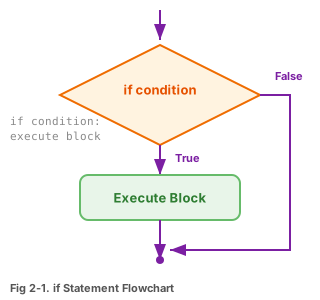
조건이 True일 때만 들여쓰기 된 코드가 실행됩니다.
그림 2-1. if문의 순서도
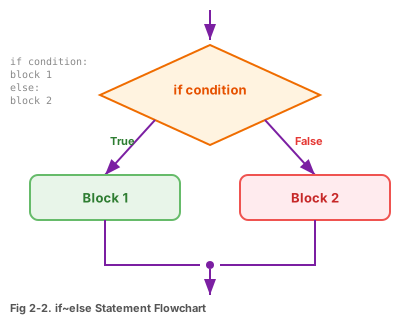
조건이 True이면 if 블록, False이면 else 블록이 실행됩니다.
그림 2-2. if~else문의 순서도
Indented code runs only when the condition is True.
Fig 2-1. if Statement Flowchart
True → if block, False → else block.
Fig 2-2. if~else Flowchart
정해진 횟수만큼 반복합니다. range(n)은 0부터 n-1까지의 숫자를 만듭니다.
range(5) → 0, 1, 2, 3, 4
range(1, 6) → 1, 2, 3, 4, 5
range(0, 10, 2) → 0, 2, 4, 6, 8
Repeat a fixed number of times. range(n) generates 0 to n-1.
range(5) → 0, 1, 2, 3, 4
range(1, 6) → 1, 2, 3, 4, 5
range(0, 10, 2) → 0, 2, 4, 6, 8
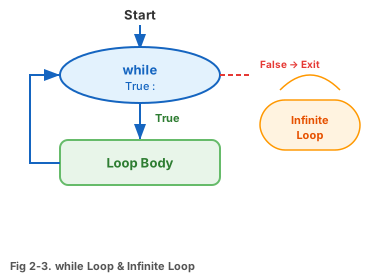
조건이 True인 동안 계속 반복합니다. 조건이 False가 되면 멈춥니다.
그림 2-3. while문과 무한 루프
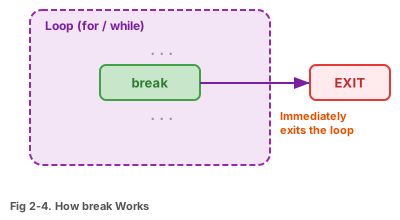
그림 2-4
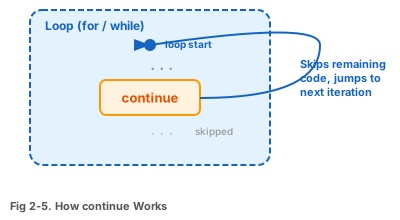
그림 2-5
반복을 즉시 종료
이번만 건너뛰고 계속
Keeps running while the condition is True. Stops when it becomes False.
Fig 2-3. while Loop & Infinite Loop
Fig 2-4
Fig 2-5
Exit loop immediately
Skip this iteration
특정 기능을 수행하는 코드 묶음입니다. 한 번 만들어두면 언제든 이름만 불러서 재사용할 수 있습니다.
def 함수이름(매개변수):
실행할 코드
return 반환값
A reusable block of code that performs a specific task. Define once, call anytime by name.
def function_name(parameters):
code to execute
return value
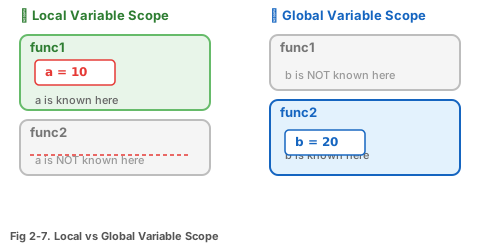
함수 안에서 만든 변수. 함수가 끝나면 사라집니다.
함수 바깥에서 만든 변수. 프로그램 전체에서 사용 가능합니다.
그림 2-7. 지역 변수와 전역 변수의 생존 범위
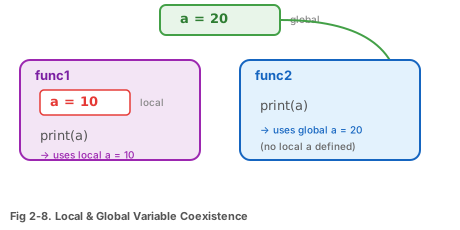
그림 2-8. 지역 변수와 전역 변수의 공존
함수 안에서 전역 변수를 수정하려면 global을 선언해야 합니다.
Created inside a function. Destroyed when the function ends.
Created outside functions. Accessible throughout the program.
Fig 2-7. Local vs Global Variable Scope
Fig 2-8. Local & Global Coexistence
To modify a global variable inside a function, declare global.
파이썬 함수는 리스트나 튜플을 사용하여 여러 값을 한 번에 반환할 수 있습니다.
교재의 모든 예제는 다음 3단계로 구성됩니다:
Python functions can return multiple values using a list or tuple.
All textbook examples follow this 3-part structure:
숫자를 입력받아 해당 단의 구구단을 출력하세요:
두 수를 받아 +, -, *, //, % 결과를 리스트로 반환하는 함수 multi()를 작성하세요. (Code02-04.py 참고)
for문과 if문을 사용하여 1부터 100까지의 짝수만 합산하세요.
힌트: i % 2 == 0 이면 짝수
Get a number, print its multiplication table:
Write a function multi() that takes two numbers and returns a list of +, -, *, //, % results. (See Code02-04.py)
Use for and if to sum only even numbers from 1 to 100.
Hint: i % 2 == 0 means even
파이썬의 데이터형은 크게 기본형과 컬렉션형으로 나뉩니다.
가변(Mutable): 생성 후 값을 변경할 수 있음 (리스트, 딕셔너리, 세트)
불변(Immutable): 생성 후 값을 변경할 수 없음 (문자열, 튜플)
Python data types fall into basic types and collection types.
Mutable: Can change after creation (list, dict, set)
Immutable: Cannot change after creation (string, tuple)
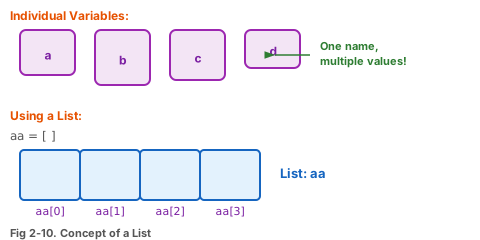
여러 값을 한 줄로 묶어 저장하는 자료구조입니다. 대괄호 [ ]로 만듭니다.
그림 2-10. 리스트의 개념
A data structure that stores multiple values in a row. Created with [ ].
Fig 2-10. Concept of a List
| 함수 | 기능 | 예시 |
|---|---|---|
| append(x) | 끝에 추가 | aa.append(50) |
| pop() | 끝에서 꺼냄 | aa.pop() |
| sort() | 정렬 | aa.sort() |
| reverse() | 뒤집기 | aa.reverse() |
| index(x) | 위치 찾기 | aa.index(20) |
| insert(i, x) | i 위치에 삽입 | aa.insert(2, 99) |
| remove(x) | 값 삭제 | aa.remove(99) |
| extend(list) | 리스트 합치기 | aa.extend([5,6]) |
| count(x) | 개수 세기 | aa.count(10) |
| len(list) | 길이 | len(aa) |
| Method | Function | Example |
|---|---|---|
| append(x) | Add to end | aa.append(50) |
| pop() | Remove from end | aa.pop() |
| sort() | Sort | aa.sort() |
| reverse() | Reverse | aa.reverse() |
| index(x) | Find position | aa.index(20) |
| insert(i, x) | Insert at i | aa.insert(2, 99) |
| remove(x) | Remove value | aa.remove(99) |
| extend(list) | Merge lists | aa.extend([5,6]) |
| count(x) | Count | aa.count(10) |
| len(list) | Length | len(aa) |
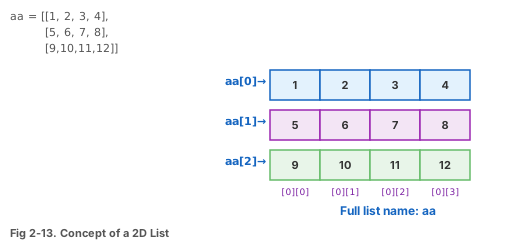
리스트 안에 리스트를 넣은 것. 표(행×열)처럼 사용합니다.
그림 2-13. 2차원 리스트의 개념
리스트를 한 줄로 만드는 간결한 방법입니다.
A list inside a list. Works like a table (rows × columns).
Fig 2-13. 2D List Concept
A concise one-liner way to create lists.
키(key)와 값(value)이 쌍으로 저장되는 자료구조입니다. 중괄호 { }로 만듭니다.
dict["키"] → 키가 없으면 오류 발생!
dict.get("키") → 키가 없으면 None 반환 (안전)
Stores key-value pairs. Created with { }.
dict["key"] → Missing key = Error!
dict.get("key") → Missing key = None (safe)
키는 유일해야 합니다. 같은 키를 두 번 쓰면 마지막 값만 남습니다.
Keys must be unique. Duplicate keys → only the last value survives.
중복 없는 값들의 모음. 중괄호 { }를 쓰지만 키:값 쌍이 아닙니다.
A collection of unique values. Uses { } without key:value pairs.
리스트와 비슷하지만 수정 불가능(읽기 전용). 소괄호 ( )로 만듭니다.
수정 가능 (가변)
aa[0] = 999 OK
수정 불가 (불변)
tt[0] = 999 Error!
Like a list but read-only (immutable). Created with ( ).
Modifiable (mutable)
aa[0] = 999 OK
Read-only (immutable)
tt[0] = 999 Error!
1~45 중 중복 없이 6개를 뽑는 프로그램입니다.
문자열에서 각 글자가 몇 번 나왔는지 딕셔너리로 셉니다.
Pick 6 unique numbers from 1-45.
Count how many times each character appears using a dictionary.
| 타입 | 기호 | 순서 | 수정 | 중복 | 용도 |
|---|---|---|---|---|---|
| 리스트 | [ ] | O | O | O | 범용 데이터 저장 |
| 튜플 | ( ) | O | X | O | 읽기 전용 데이터 |
| 딕셔너리 | { : } | X | O | 키 X | 키-값 매핑 |
| 세트 | { } | X | O | X | 중복 제거, 집합 |
| 문자열 | " " | O | X | O | 텍스트 |
① 리스트가 가장 많이 사용됨 (3장부터 자료구조의 기본!)
② 딕셔너리는 이름으로 데이터를 찾을 때 유용
③ 튜플은 변경하면 안 되는 데이터에 사용
④ 세트는 중복 제거 & 집합 연산에 활용
| Type | Symbol | Ordered | Mutable | Duplicates | Use Case |
|---|---|---|---|---|---|
| List | [ ] | Yes | Yes | Yes | General storage |
| Tuple | ( ) | Yes | No | Yes | Read-only data |
| Dict | { : } | No | Yes | Keys: No | Key-value mapping |
| Set | { } | No | Yes | No | Dedup, set ops |
| String | " " | Yes | No | Yes | Text |
① Lists are the most used (foundation for Ch.3 data structures!)
② Dicts are great for looking up data by name
③ Tuples protect data from accidental changes
④ Sets for deduplication & set operations
리스트를 사용하여 4개의 숫자를 입력받고 합계를 구하세요:
4×3 크기의 2차원 리스트를 만들고 (12부터 1까지 역순), 전체 합계를 출력하세요:
몇 번 뽑을지 입력받아 그 횟수만큼 로또 번호(1~45, 6개)를 생성하세요.
진달래꽃 시에서 4회 이상 나온 글자와 빈도수를 출력하세요. (실습자료의 진달래꽃.txt 활용)
Use a list to get 4 numbers from input and calculate the sum:
Create a 4×3 2D list (12 down to 1), print total sum:
Ask how many sets to generate, then create that many lotto picks (1-45, 6 numbers each).
Count characters appearing 4+ times in a Korean poem. (Use 진달래꽃.txt from practice files)