
Chapter 02
파이썬 기초 문법과 데이터 형식
Python Basics & Data Types
Part 1  파이썬 기초 문법 · Python Basic Syntax
Part 2  제어문과 함수 · Control Flow & Functions
Part 3  데이터형 · Data Types
01
Part 1
파이썬 기초 문법
Python Basic Syntax
약 1시간 · Approx. 1 hour

파이썬 이름 이야기

The Story Behind Python's Name
한국어

파이썬의 유래

귀도 반 로썸(Guido van Rossum)이 1991년에 공식 발표한 프로그래밍 언어입니다.

이름은 영국 코미디 프로그램 "몬티 파이튼의 날아다니는 서커스"(Monty Python's Flying Circus)에서 따왔습니다.

Python Logo Monty Python's Flying Circus

왜 뱀이 로고일까?

Python은 영어로 비단뱀이라는 뜻이기도 합니다. 코미디 프로그램 이름에서 따왔지만, 로고는 뱀 두 마리가 얽힌 모양입니다.

파이썬의 특징

  • 읽기 쉬움 — 영어 문장처럼 자연스러운 코드
  • 배우기 쉬움 — 프로그래밍 입문자에게 최적
  • 무료 — 오픈소스, 누구나 사용 가능
  • 다양한 활용 — AI, 웹, 데이터 분석, 게임 등
English

Origin of Python

Guido van Rossum created Python, officially released in 1991.

The name comes from the British comedy show "Monty Python's Flying Circus" — not the snake!

Python Logo Monty Python's Flying Circus

Why a Snake Logo?

"Python" also means a large snake in English. Though named after the comedy show, the logo features two intertwined snakes.

Why Python?

  • Readable — Code reads like English
  • Easy to learn — Perfect for beginners
  • Free — Open source, anyone can use it
  • Versatile — AI, web, data science, games, etc.
변수와 변수 선언

Variables & Declaration
한국어

변수란?

변수는 데이터를 저장하는 상자입니다. 이름표를 붙여서 언제든 꺼내 쓸 수 있습니다.

# 한 줄에 하나씩 선언 a = 100 b = 3.14 c = "Hello" d = True # 한 줄에 여러 개 선언 x, y, z = 10, 20, 30

변수의 타입 확인

type() 함수로 변수의 데이터 타입을 확인할 수 있습니다.

>>> type(a) <class 'int'> # 정수 >>> type(b) <class 'float'> # 실수 >>> type(c) <class 'str'> # 문자열 >>> type(d) <class 'bool'> # 참/거짓

파이썬은 타입 선언이 불필요!

C/Java에서는 int a = 100;처럼 타입을 명시해야 하지만, 파이썬은 값을 넣으면 자동으로 타입이 결정됩니다.

English

What is a Variable?

A variable is a named box that stores data. Give it a label, use it anytime.

# One per line a = 100 b = 3.14 c = "Hello" d = True # Multiple on one line x, y, z = 10, 20, 30

Checking Variable Types

Use type() to check a variable's data type.

>>> type(a) <class 'int'> # integer >>> type(b) <class 'float'> # decimal >>> type(c) <class 'str'> # string >>> type(d) <class 'bool'> # boolean

No Type Declarations Needed!

In C/Java you write int a = 100;, but Python automatically determines the type from the assigned value.

print() 함수

The print() Function
한국어

화면에 출력하기

print() 함수는 괄호 안의 내용을 화면에 출력합니다.

# 기본 출력 print("Hello, World!") print(100) # 숫자 100 (백) print("100") # 문자 "100" (일영영) # 여러 값 출력 (콤마로 구분) print("나이:", 20, "세") # 출력: 나이: 20 세

서식 지정 출력

# % 서식 print("정수: %d" % 42) print("실수: %f" % 3.14) print("문자: %s" % "파이썬") print("%d + %d = %d" % (3, 5, 8)) # f-string (권장!) name = "홍길동" age = 20 print(f"이름: {name}, 나이: {age}")
서식의미예시
%d정수print("%d" % 42)
%f실수print("%f" % 3.14)
%s문자열print("%s" % "Hi")
%c문자 1개print("%c" % 'A')
%o8진수print("%o" % 10)
%x16진수print("%x" % 255)
English

Printing to Screen

print() outputs whatever is inside the parentheses.

# Basic output print("Hello, World!") print(100) # number 100 print("100") # string "100" # Multiple values (comma-separated) print("Age:", 20, "years") # Output: Age: 20 years

Formatted Output

# % formatting print("Integer: %d" % 42) print("Float: %f" % 3.14) print("String: %s" % "Python") print("%d + %d = %d" % (3, 5, 8)) # f-string (recommended!) name = "Gil-dong" age = 20 print(f"Name: {name}, Age: {age}")
FormatMeaningExample
%dIntegerprint("%d" % 42)
%fFloatprint("%f" % 3.14)
%sStringprint("%s" % "Hi")
%cCharacterprint("%c" % 'A')
%oOctalprint("%o" % 10)
%xHexprint("%x" % 255)

print() 주의사항

print() Common Mistakes
한국어

올바른 예 vs 잘못된 예

올바른 예

print("%d" % 100) # 숫자 100 print("%s" % "100") # 문자 100 print("%d + %d" % (100, 100)) # 출력: 100 + 100

잘못된 예

# 서식 개수와 값 개수가 다르면 오류! print("%d %d" % 100) # TypeError: 서식 2개인데 값 1개 print("%d" % (100, 200)) # TypeError: 서식 1개인데 값 2개

핵심 규칙

%d, %f, %s의 개수값의 개수가 반드시 일치해야 합니다. 값이 여러 개이면 ( )로 묶고 콤마(,)로 구분합니다.

English

Correct vs Incorrect

Correct

print("%d" % 100) # number 100 print("%s" % "100") # string 100 print("%d + %d" % (100, 100)) # Output: 100 + 100

Incorrect

# Format count ≠ value count → Error! print("%d %d" % 100) # TypeError: 2 formats but 1 value print("%d" % (100, 200)) # TypeError: 1 format but 2 values

Key Rule

The number of format specifiers (%d, %f, %s) must match the number of values. Multiple values go inside ( ) separated by commas.

input() 함수

The input() Function
한국어

키보드로 값 입력받기

input() 함수는 키보드로 값을 입력받습니다. 항상 문자열로 반환합니다.

# 기본 사용 name = input() print(name) # 설명 메시지 포함 (권장) name = input("이름을 입력하세요: ") print("안녕하세요,", name)

주의: 숫자 입력

input()은 항상 문자열을 반환하므로, 숫자 계산에 사용하려면 반드시 변환해야 합니다!

# 잘못된 예 a = input("숫자: ") print(a + a) # "5" + "5" = "55" (문자열 연결!) # 올바른 예 a = int(input("숫자: ")) print(a + a) # 5 + 5 = 10 (숫자 덧셈)

형변환 함수

int(): 정수로 변환  |  float(): 실수로 변환  |  str(): 문자열로 변환

English

Getting Keyboard Input

input() reads keyboard input. It always returns a string.

# Basic usage name = input() print(name) # With prompt message (recommended) name = input("Enter your name: ") print("Hello,", name)

Warning: Numeric Input

input() always returns a string, so you must convert it for math!

# Wrong a = input("Number: ") print(a + a) # "5" + "5" = "55" (string concat!) # Correct a = int(input("Number: ")) print(a + a) # 5 + 5 = 10 (addition)

Type Conversion Functions

int(): to integer  |  float(): to decimal  |  str(): to string

산술 연산자

Arithmetic Operators
한국어

산술 연산자 종류

연산자기능예시결과
+덧셈10 + 313
-뺄셈10 - 37
*곱셈10 * 330
/나눗셈10 / 33.333...
//10 // 33
%나머지10 % 31
**거듭제곱2 ** 101024
# 실전 예제 a, b = 10, 3 print("a + b =", a + b) # 13 print("a // b =", a // b) # 3 (몫) print("a % b =", a % b) # 1 (나머지) print("a ** b =", a ** b) # 1000

// 와 % 는 자주 쓰입니다!

// (몫)와 % (나머지)는 짝수/홀수 판별, 자릿수 추출 등에 매우 유용합니다.

English

Arithmetic Operators

OperatorFunctionExampleResult
+Addition10 + 313
-Subtraction10 - 37
*Multiplication10 * 330
/Division10 / 33.333...
//Floor division10 // 33
%Modulo10 % 31
**Power2 ** 101024
# Example a, b = 10, 3 print("a + b =", a + b) # 13 print("a // b =", a // b) # 3 (quotient) print("a % b =", a % b) # 1 (remainder) print("a ** b =", a ** b) # 1000

// and % are very useful!

// (quotient) and % (remainder) are great for even/odd checks, digit extraction, etc.

대입 연산자와 관계 연산자

Assignment & Comparison Operators
한국어

대입 연산자

변수에 값을 저장하거나, 기존 값을 변경할 때 사용합니다.

연산자의미예시동일 표현
=대입a = 10-
+=더하고 대입a += 5a = a + 5
-=빼고 대입a -= 3a = a - 3
*=곱하고 대입a *= 2a = a * 2
/=나누고 대입a /= 4a = a / 4
//=몫 대입a //= 3a = a // 3
%=나머지 대입a %= 2a = a % 2

관계 연산자

두 값을 비교하여 True 또는 False를 반환합니다.

연산자의미예시 (a=100)결과
==같다a == 200False
!=다르다a != 200True
>크다a > 50True
<작다a < 50False
>=크거나 같다a >= 100True
<=작거나 같다a <= 99False
English

Assignment Operators

Store or update values in variables.

OpMeaningExampleEquivalent
=Assigna = 10-
+=Add & assigna += 5a = a + 5
-=Sub & assigna -= 3a = a - 3
*=Mul & assigna *= 2a = a * 2
/=Div & assigna /= 4a = a / 4
//=Floor & assigna //= 3a = a // 3
%=Mod & assigna %= 2a = a % 2

Comparison Operators

Compare two values, return True or False.

OpMeaningExample (a=100)Result
==Equala == 200False
!=Not equala != 200True
>Greatera > 50True
<Lessa < 50False
>=Greater/equala >= 100True
<=Less/equala <= 99False

문자열과 숫자의 상호 변환

String ↔ Number Conversion
한국어

왜 변환이 필요한가?

input()은 항상 문자열을 반환하므로, 계산에 사용하려면 숫자로 변환해야 합니다. 반대로 숫자를 문자열에 합치려면 str()로 변환합니다.

# 문자열 → 숫자 s1 = "100" n1 = int(s1) # 정수 100 n2 = float(s1) # 실수 100.0 print(n1 + n1) # 200 # 숫자 → 문자열 n3 = 200 s2 = str(n3) # 문자열 "200" print(s2 + s2) # "200200"
문자열 "100" 숫자 100 int() / float() str()

변환 불가능한 경우

int("hello") # ValueError 오류! int("3.14") # ValueError 오류! float("3.14") # OK → 3.14
English

Why Convert?

input() always returns strings — convert to numbers for math. Use str() to concatenate numbers with strings.

# String → Number s1 = "100" n1 = int(s1) # integer 100 n2 = float(s1) # float 100.0 print(n1 + n1) # 200 # Number → String n3 = 200 s2 = str(n3) # string "200" print(s2 + s2) # "200200"
String "100" Number 100 int() / float() str()

Invalid Conversions

int("hello") # ValueError! int("3.14") # ValueError! float("3.14") # OK → 3.14

Part 1 실습문제

Part 1 Practice
한국어
실습 1-1: 자기소개 프로그램

input()으로 이름, 나이, 학과를 입력받아 다음과 같이 출력하세요:

# 실행 결과 예시 이름을 입력하세요: 홍길동 나이를 입력하세요: 20 학과를 입력하세요: 컴퓨터공학 안녕하세요! 저는 홍길동(20세)이고, 컴퓨터공학과에 재학 중입니다.
실습 1-2: 사칙연산 계산기

두 숫자를 입력받아 +, -, *, /, //, % 결과를 모두 출력하세요:

# 실행 결과 예시 첫 번째 숫자: 10 두 번째 숫자: 3 10 + 3 = 13 10 - 3 = 7 10 * 3 = 30 10 / 3 = 3.3333 10 // 3 = 3 10 % 3 = 1
실습 1-3: 온도 변환기

섭씨 온도를 입력받아 화씨로 변환하세요. 공식: F = C × 9/5 + 32

English
Practice 1-1: Self-Introduction

Use input() to get name, age, and major, then print:

# Expected output Enter name: Gil-dong Enter age: 20 Enter major: Computer Science Hello! I'm Gil-dong (age 20), studying Computer Science.
Practice 1-2: Calculator

Get two numbers, print all operation results:

# Expected output First number: 10 Second number: 3 10 + 3 = 13 10 - 3 = 7 10 * 3 = 30 10 / 3 = 3.3333 10 // 3 = 3 10 % 3 = 1
Practice 1-3: Temperature Converter

Convert Celsius to Fahrenheit. Formula: F = C × 9/5 + 32

02
Part 2
제어문과 함수
Control Flow & Functions
약 1시간 · Approx. 1 hour

if 조건문

if Conditionals
한국어

기본 if문

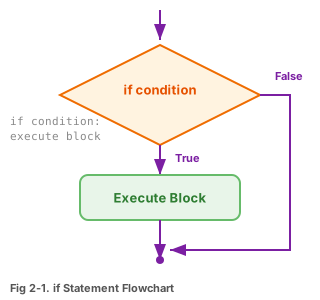
조건이 True일 때만 들여쓰기 된 코드가 실행됩니다.

if 순서도

그림 2-1. if문의 순서도

if 조건식: 실행할 코드 # 들여쓰기 필수!
a = 100 if a > 50: print("a는 50보다 큽니다") print("프로그램 끝") # 출력: a는 50보다 큽니다 # 프로그램 끝

if ~ else문

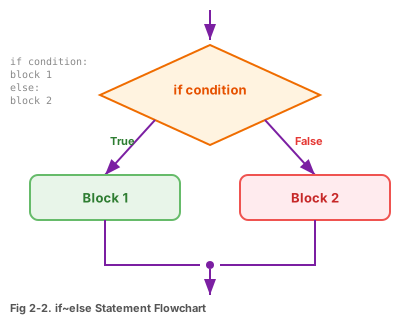
조건이 True이면 if 블록, False이면 else 블록이 실행됩니다.

if-else 순서도

그림 2-2. if~else문의 순서도

a = 200 if a < 100: print("100 미만") else: print("100 이상") # 출력: 100 이상

if ~ elif ~ else문

score = 85 if score >= 90: print("A학점") elif score >= 80: print("B학점") elif score >= 70: print("C학점") else: print("F학점") # 출력: B학점
English

Basic if Statement

Indented code runs only when the condition is True.

if Flowchart

Fig 2-1. if Statement Flowchart

if condition: code_to_run # indentation required!
a = 100 if a > 50: print("a is greater than 50") print("Program end") # Output: a is greater than 50 # Program end

if ~ else

True → if block, False → else block.

if-else Flowchart

Fig 2-2. if~else Flowchart

a = 200 if a < 100: print("Less than 100") else: print("100 or more") # Output: 100 or more

if ~ elif ~ else

score = 85 if score >= 90: print("Grade A") elif score >= 80: print("Grade B") elif score >= 70: print("Grade C") else: print("Grade F") # Output: Grade B

for 반복문

for Loop
한국어

for문 기본 형식

정해진 횟수만큼 반복합니다. range(n)은 0부터 n-1까지의 숫자를 만듭니다.

for 변수 in range(시작, 끝, 증가): 반복할 코드
# 0부터 2까지 출력 for i in range(0, 3, 1): print(i) # 출력: 0, 1, 2 # range 생략 형태 for i in range(3): # range(0, 3, 1)과 동일 print(i) # 1부터 10까지 합계 hap = 0 for i in range(1, 11): hap += i print("합계:", hap) # 55

range() 사용법 정리

range(5) → 0, 1, 2, 3, 4

range(1, 6) → 1, 2, 3, 4, 5

range(0, 10, 2) → 0, 2, 4, 6, 8

English

for Loop Syntax

Repeat a fixed number of times. range(n) generates 0 to n-1.

for variable in range(start, end, step): code_to_repeat
# Print 0 to 2 for i in range(0, 3, 1): print(i) # Output: 0, 1, 2 # Shorthand for i in range(3): # same as range(0, 3, 1) print(i) # Sum 1 to 10 hap = 0 for i in range(1, 11): hap += i print("Sum:", hap) # 55

range() Quick Reference

range(5) → 0, 1, 2, 3, 4

range(1, 6) → 1, 2, 3, 4, 5

range(0, 10, 2) → 0, 2, 4, 6, 8

while 반복문

while Loop
한국어

while문 기본 형식

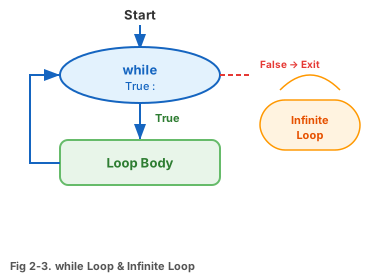
조건이 True인 동안 계속 반복합니다. 조건이 False가 되면 멈춥니다.

while 루프 다이어그램

그림 2-3. while문과 무한 루프

while 조건식: 반복할 코드 조건을 변화시키는 코드 # 이게 없으면 무한 루프!
# 1부터 10까지 출력 i = 1 while i <= 10: print(i, end=" ") i += 1 # 출력: 1 2 3 4 5 6 7 8 9 10

무한 루프 주의!

# 이 코드는 영원히 멈추지 않습니다! while True: print("무한 반복!") # 중지하려면: Ctrl + C

break와 continue

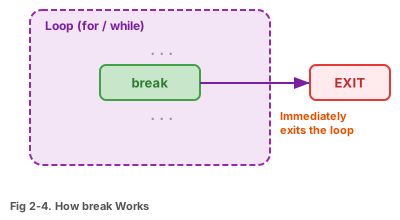
break 작동

그림 2-4

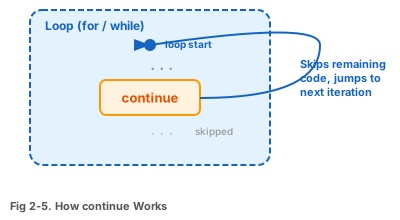
continue 작동

그림 2-5

break

반복을 즉시 종료

for i in range(99): print(i) break # 0만 출력 후 종료

continue

이번만 건너뛰고 계속

for i in range(5): if i == 2: continue print(i) # 0 1 3 4 (2만 건너뜀)
English

while Loop Syntax

Keeps running while the condition is True. Stops when it becomes False.

while Loop Diagram

Fig 2-3. while Loop & Infinite Loop

while condition: code_to_repeat update_condition # without this → infinite loop!
# Print 1 to 10 i = 1 while i <= 10: print(i, end=" ") i += 1 # Output: 1 2 3 4 5 6 7 8 9 10

Watch for Infinite Loops!

# This never stops! while True: print("Forever!") # To stop: Ctrl + C

break and continue

break

Fig 2-4

continue

Fig 2-5

break

Exit loop immediately

for i in range(99): print(i) break # prints 0 then stops

continue

Skip this iteration

for i in range(5): if i == 2: continue print(i) # 0 1 3 4 (skips 2)

함수

Functions
한국어

함수란?

특정 기능을 수행하는 코드 묶음입니다. 한 번 만들어두면 언제든 이름만 불러서 재사용할 수 있습니다.

입력 (매개변수) 함수 가공 & 처리 반환값
# 함수 선언 def plus(v1, v2): result = v1 + v2 return result # 함수 호출 hap = plus(100, 200) print("결과:", hap) # 결과: 300

함수 구조

def 함수이름(매개변수):

    실행할 코드

    return 반환값

English

What is a Function?

A reusable block of code that performs a specific task. Define once, call anytime by name.

Input (params) Function Process Return value
# Define a function def plus(v1, v2): result = v1 + v2 return result # Call the function hap = plus(100, 200) print("Result:", hap) # Result: 300

Function Structure

def function_name(parameters):

    code to execute

    return value

지역 변수와 전역 변수

Local vs Global Variables
한국어

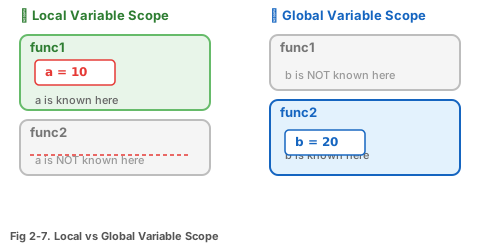
지역 변수 (Local)

함수 안에서 만든 변수. 함수가 끝나면 사라집니다.

전역 변수 (Global)

함수 바깥에서 만든 변수. 프로그램 전체에서 사용 가능합니다.

변수 생존 범위

그림 2-7. 지역 변수와 전역 변수의 생존 범위

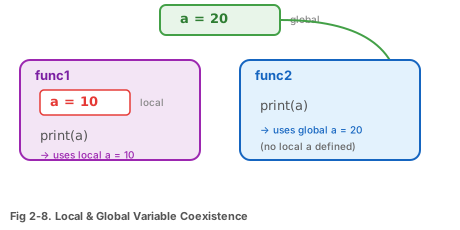
변수 공존

그림 2-8. 지역 변수와 전역 변수의 공존

def func1(): a = 10 # 지역 변수 print("func1의 a:", a) def func2(): print("func2의 a:", a) a = 20 # 전역 변수 func1() # func1의 a: 10 (지역변수 우선) func2() # func2의 a: 20 (전역변수 사용)

global 예약어

함수 안에서 전역 변수를 수정하려면 global을 선언해야 합니다.

def func1(): global a # 전역 변수 a를 사용하겠다! a = 10 a = 20 func1() print(a) # 10 (전역 변수가 변경됨)
English

Local Variables

Created inside a function. Destroyed when the function ends.

Global Variables

Created outside functions. Accessible throughout the program.

Variable Scope

Fig 2-7. Local vs Global Variable Scope

Variable Coexistence

Fig 2-8. Local & Global Coexistence

def func1(): a = 10 # local variable print("func1 a:", a) def func2(): print("func2 a:", a) a = 20 # global variable func1() # func1 a: 10 (local wins) func2() # func2 a: 20 (uses global)

global Keyword

To modify a global variable inside a function, declare global.

def func1(): global a # I'll use global a! a = 10 a = 20 func1() print(a) # 10 (global was modified)

반환 값이 여러 개인 함수

Returning Multiple Values
한국어

리스트로 여러 값 반환

파이썬 함수는 리스트튜플을 사용하여 여러 값을 한 번에 반환할 수 있습니다.

def multi(v1, v2): retList = [] retList.append(v1 + v2) # 합 retList.append(v1 - v2) # 차 return retList myList = multi(100, 200) hap = myList[0] # 300 sub = myList[1] # -100 print("합: %d, 차: %d" % (hap, sub))

튜플 언패킹으로 간단하게

def calc(v1, v2): return v1 + v2, v1 - v2, v1 * v2 # 한 줄로 여러 값 받기 hap, sub, mul = calc(10, 3) print(hap, sub, mul) # 13 7 30

프로그램 구조 템플릿

교재의 모든 예제는 다음 3단계로 구성됩니다:

## 함수 선언 부분 ## def myFunc(): ... ## 전역 변수 부분 ## 변수 = 초기값 ## 메인 코드 부분 ## myFunc() print(결과)
English

Returning Multiple Values via List

Python functions can return multiple values using a list or tuple.

def multi(v1, v2): retList = [] retList.append(v1 + v2) # sum retList.append(v1 - v2) # diff return retList myList = multi(100, 200) hap = myList[0] # 300 sub = myList[1] # -100 print("Sum: %d, Diff: %d" % (hap, sub))

Simpler: Tuple Unpacking

def calc(v1, v2): return v1 + v2, v1 - v2, v1 * v2 # Receive multiple values in one line hap, sub, mul = calc(10, 3) print(hap, sub, mul) # 13 7 30

Program Structure Template

All textbook examples follow this 3-part structure:

## Function declarations ## def myFunc(): ... ## Global variables ## variable = initial_value ## Main code ## myFunc() print(result)

Part 2 실습문제

Part 2 Practice
한국어
실습 2-1: 구구단 출력기

숫자를 입력받아 해당 단의 구구단을 출력하세요:

# 실행 예시 몇 단? 5 5 x 1 = 5 5 x 2 = 10 ... 5 x 9 = 45
실습 2-2: 사칙연산 함수

두 수를 받아 +, -, *, //, % 결과를 리스트로 반환하는 함수 multi()를 작성하세요. (Code02-04.py 참고)

def multi(v1, v2): retList = [] # 여기에 6가지 연산 결과를 append return retList result = multi(100, 20) print(result)
실습 2-3: 1~100 짝수 합

for문과 if문을 사용하여 1부터 100까지의 짝수만 합산하세요.

힌트: i % 2 == 0 이면 짝수

English
Practice 2-1: Multiplication Table

Get a number, print its multiplication table:

# Example Which table? 5 5 x 1 = 5 5 x 2 = 10 ... 5 x 9 = 45
Practice 2-2: Multi-Operation Function

Write a function multi() that takes two numbers and returns a list of +, -, *, //, % results. (See Code02-04.py)

def multi(v1, v2): retList = [] # append 6 operation results here return retList result = multi(100, 20) print(result)
Practice 2-3: Sum of Even Numbers 1-100

Use for and if to sum only even numbers from 1 to 100.

Hint: i % 2 == 0 means even

03
Part 3
데이터형
Data Types
약 1시간 · Approx. 1 hour

파이썬 데이터형 분류

Python Data Type Classification
한국어

데이터형의 큰 그림

파이썬의 데이터형은 크게 기본형컬렉션형으로 나뉩니다.

파이썬 데이터형 기본 데이터형 컬렉션 데이터형 bool int / float 리스트 가변 딕셔너리 가변 세트 가변 str 불변 튜플 불변 가변 = 수정 가능 | 불변 = 수정 불가 (읽기 전용)

가변 vs 불변

가변(Mutable): 생성 후 값을 변경할 수 있음 (리스트, 딕셔너리, 세트)

불변(Immutable): 생성 후 값을 변경할 수 없음 (문자열, 튜플)

English

The Big Picture

Python data types fall into basic types and collection types.

Python Data Types Basic Types Collection Types bool int / float List mutable Dict mutable Set mutable str immut. Tuple immut. Mutable = changeable | Immutable = read-only

Mutable vs Immutable

Mutable: Can change after creation (list, dict, set)

Immutable: Cannot change after creation (string, tuple)

리스트 (List)

Lists
한국어

리스트란?

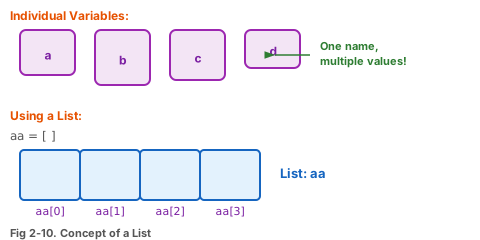
여러 값을 한 줄로 묶어 저장하는 자료구조입니다. 대괄호 [ ]로 만듭니다.

리스트 개념

그림 2-10. 리스트의 개념

aa = [10, 20, 30, 40] 10 20 30 40 [0] [1] [2] [3]
# 리스트 생성 aa = [10, 20, 30, 40] print(aa[0]) # 10 (첫 번째) print(aa[-1]) # 40 (마지막) print(aa[1:3]) # [20, 30] (슬라이싱) # 빈 리스트 생성 + 추가 bb = [] bb.append(100) bb.append(200) print(bb) # [100, 200] # for문으로 리스트 만들기 cc = [] for i in range(5): cc.append(i * 10) print(cc) # [0, 10, 20, 30, 40]
English

What is a List?

A data structure that stores multiple values in a row. Created with [ ].

List Concept

Fig 2-10. Concept of a List

aa = [10, 20, 30, 40] 10 20 30 40 [0] [1] [2] [3]
# Creating a list aa = [10, 20, 30, 40] print(aa[0]) # 10 (first) print(aa[-1]) # 40 (last) print(aa[1:3]) # [20, 30] (slicing) # Empty list + append bb = [] bb.append(100) bb.append(200) print(bb) # [100, 200] # Build list with for loop cc = [] for i in range(5): cc.append(i * 10) print(cc) # [0, 10, 20, 30, 40]

리스트 조작 함수

List Methods
한국어

자주 쓰는 리스트 함수

함수기능예시
append(x)끝에 추가aa.append(50)
pop()끝에서 꺼냄aa.pop()
sort()정렬aa.sort()
reverse()뒤집기aa.reverse()
index(x)위치 찾기aa.index(20)
insert(i, x)i 위치에 삽입aa.insert(2, 99)
remove(x)값 삭제aa.remove(99)
extend(list)리스트 합치기aa.extend([5,6])
count(x)개수 세기aa.count(10)
len(list)길이len(aa)
myList = [30, 10, 20] myList.append(40) # [30,10,20,40] myList.sort() # [10,20,30,40] myList.reverse() # [40,30,20,10] myList.insert(2, 99) # [40,30,99,20,10] myList.remove(99) # [40,30,20,10] print(myList.pop()) # 10 (꺼냄)
English

Common List Methods

MethodFunctionExample
append(x)Add to endaa.append(50)
pop()Remove from endaa.pop()
sort()Sortaa.sort()
reverse()Reverseaa.reverse()
index(x)Find positionaa.index(20)
insert(i, x)Insert at iaa.insert(2, 99)
remove(x)Remove valueaa.remove(99)
extend(list)Merge listsaa.extend([5,6])
count(x)Countaa.count(10)
len(list)Lengthlen(aa)
myList = [30, 10, 20] myList.append(40) # [30,10,20,40] myList.sort() # [10,20,30,40] myList.reverse() # [40,30,20,10] myList.insert(2, 99) # [40,30,99,20,10] myList.remove(99) # [40,30,20,10] print(myList.pop()) # 10 (extracted)

2차원 리스트와 컴프리헨션

2D Lists & Comprehensions
한국어

2차원 리스트

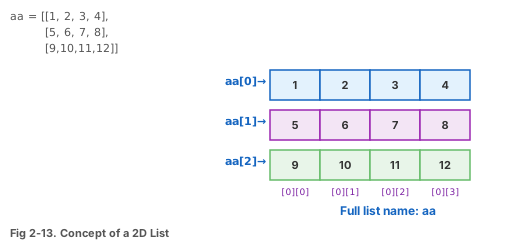
리스트 안에 리스트를 넣은 것. 표(행×열)처럼 사용합니다.

2차원 리스트

그림 2-13. 2차원 리스트의 개념

# 3행 4열 2차원 리스트 만들기 list2 = [] value = 1 for i in range(3): row = [] for k in range(4): row.append(value) value += 1 list2.append(row) # 결과: [[1,2,3,4], [5,6,7,8], [9,10,11,12]] print(list2[1][2]) # 7 (2행 3열)

컴프리헨션 (함축)

리스트를 한 줄로 만드는 간결한 방법입니다.

# 기본 nums = [i for i in range(5)] # [0, 1, 2, 3, 4] # 제곱 sq = [i**2 for i in range(1, 6)] # [1, 4, 9, 16, 25] # 조건 포함 (3의 배수만) mul3 = [i for i in range(1, 21) if i%3==0] # [3, 6, 9, 12, 15, 18] # 2차원 (3×4 영행렬) zeros = [[0]*4 for _ in range(3)]
English

2D Lists

A list inside a list. Works like a table (rows × columns).

2D List

Fig 2-13. 2D List Concept

# Build 3×4 2D list list2 = [] value = 1 for i in range(3): row = [] for k in range(4): row.append(value) value += 1 list2.append(row) # Result: [[1,2,3,4], [5,6,7,8], [9,10,11,12]] print(list2[1][2]) # 7 (row 2, col 3)

List Comprehension

A concise one-liner way to create lists.

# Basic nums = [i for i in range(5)] # [0, 1, 2, 3, 4] # Squares sq = [i**2 for i in range(1, 6)] # [1, 4, 9, 16, 25] # With condition (multiples of 3) mul3 = [i for i in range(1, 21) if i%3==0] # [3, 6, 9, 12, 15, 18] # 2D (3×4 zeros) zeros = [[0]*4 for _ in range(3)]

딕셔너리 (Dictionary)

Dictionaries
한국어

딕셔너리란?

키(key)값(value)이 쌍으로 저장되는 자료구조입니다. 중괄호 { }로 만듭니다.

# 생성 student = { "이름": "홍길동", "나이": 20, "학과": "컴퓨터공학" } # 접근 print(student["이름"]) # 홍길동 print(student.get("나이")) # 20 # 추가 및 수정 student["연락처"] = "010-1234" # 추가 student["나이"] = 21 # 수정 # 삭제 del student["학과"]

[ ] vs .get() 차이

dict["키"] → 키가 없으면 오류 발생!

dict.get("키") → 키가 없으면 None 반환 (안전)

English

What is a Dictionary?

Stores key-value pairs. Created with { }.

# Creation student = { "name": "Gil-dong", "age": 20, "major": "Computer Science" } # Access print(student["name"]) # Gil-dong print(student.get("age")) # 20 # Add & modify student["phone"] = "010-1234" # add student["age"] = 21 # modify # Delete del student["major"]

[ ] vs .get() Difference

dict["key"] → Missing key = Error!

dict.get("key") → Missing key = None (safe)

딕셔너리 활용

Dictionary Operations
한국어

키, 값, 아이템 접근

singer = {"이름": "트와이스", "인원": 9} # 모든 키 print(singer.keys()) # dict_keys(['이름', '인원']) # 모든 값 print(singer.values()) # dict_values(['트와이스', 9]) # 키-값 쌍 print(singer.items()) # dict_items([('이름','트와이스'),('인원',9)])

딕셔너리 순회

# for문으로 전체 출력 for k in singer.keys(): print(f"{k} --> {singer[k]}") # 키 존재 여부 확인 print("이름" in singer) # True print("나이" in singer) # False

딕셔너리 주의사항

키는 유일해야 합니다. 같은 키를 두 번 쓰면 마지막 값만 남습니다.

English

Accessing Keys, Values, Items

singer = {"name": "TWICE", "members": 9} # All keys print(singer.keys()) # dict_keys(['name', 'members']) # All values print(singer.values()) # dict_values(['TWICE', 9]) # Key-value pairs print(singer.items()) # dict_items([('name','TWICE'),('members',9)])

Iterating a Dictionary

# Print all with for loop for k in singer.keys(): print(f"{k} --> {singer[k]}") # Check if key exists print("name" in singer) # True print("age" in singer) # False

Dictionary Note

Keys must be unique. Duplicate keys → only the last value survives.

세트와 문자열

Sets & Strings
한국어

세트 (Set)

중복 없는 값들의 모음. 중괄호 { }를 쓰지만 키:값 쌍이 아닙니다.

# 세트 생성 s1 = {1, 2, 3, 1, 2} print(s1) # {1, 2, 3} — 중복 제거! # 리스트의 중복 제거에 활용 myList = [1, 1, 2, 3, 3] print(set(myList)) # {1, 2, 3} # 집합 연산 a = {1, 2, 3} b = {3, 4, 5} print(a & b) # {3} 교집합 print(a | b) # {1,2,3,4,5} 합집합 print(a - b) # {1, 2} 차집합

문자열 (String)

s = "Hello Python" print(len(s)) # 12 (길이) print(s.count("l")) # 2 (개수) print(s.find("Py")) # 6 (위치) print(s.split()) # ['Hello','Python'] print("-".join(["a","b","c"])) # "a-b-c"
English

Sets

A collection of unique values. Uses { } without key:value pairs.

# Creating a set s1 = {1, 2, 3, 1, 2} print(s1) # {1, 2, 3} — duplicates removed! # Remove duplicates from list myList = [1, 1, 2, 3, 3] print(set(myList)) # {1, 2, 3} # Set operations a = {1, 2, 3} b = {3, 4, 5} print(a & b) # {3} intersection print(a | b) # {1,2,3,4,5} union print(a - b) # {1, 2} difference

Strings

s = "Hello Python" print(len(s)) # 12 (length) print(s.count("l")) # 2 (count) print(s.find("Py")) # 6 (position) print(s.split()) # ['Hello','Python'] print("-".join(["a","b","c"])) # "a-b-c"

튜플 (Tuple)

Tuples
한국어

튜플이란?

리스트와 비슷하지만 수정 불가능(읽기 전용). 소괄호 ( )로 만듭니다.

# 튜플 생성 tt1 = (10, 20, 30) tt2 = 10, 20, 30 # 괄호 생략 가능 # 접근 (리스트와 동일) print(tt1[0]) # 10 print(tt1[1:3]) # (20, 30) # 수정 시도 → 오류! tt1[0] = 999 # TypeError!

항목 1개인 튜플 주의

t1 = (10) # 이건 그냥 숫자 10! t2 = (10,) # 이것이 진짜 튜플! print(type(t1)) # <class 'int'> print(type(t2)) # <class 'tuple'>

리스트 [ ]

수정 가능 (가변)

aa[0] = 999 OK

튜플 ( )

수정 불가 (불변)

tt[0] = 999 Error!

English

What is a Tuple?

Like a list but read-only (immutable). Created with ( ).

# Creating tuples tt1 = (10, 20, 30) tt2 = 10, 20, 30 # parentheses optional # Access (same as list) print(tt1[0]) # 10 print(tt1[1:3]) # (20, 30) # Modification attempt → Error! tt1[0] = 999 # TypeError!

Single-Item Tuple Gotcha

t1 = (10) # just the number 10! t2 = (10,) # this is a real tuple! print(type(t1)) # <class 'int'> print(type(t2)) # <class 'tuple'>

List [ ]

Modifiable (mutable)

aa[0] = 999 OK

Tuple ( )

Read-only (immutable)

tt[0] = 999 Error!

응용예제

Application Examples
한국어

응용 1: 자동 로또 번호 생성기

1~45 중 중복 없이 6개를 뽑는 프로그램입니다.

import random lotto = [] while len(lotto) < 6: num = random.randint(1, 45) if num not in lotto: lotto.append(num) lotto.sort() print("로또 번호:", lotto)

응용 2: 글자 빈도수 세기

문자열에서 각 글자가 몇 번 나왔는지 딕셔너리로 셉니다.

text = "hello world" countDic = {} for ch in text: if ch.isalpha(): if ch in countDic: countDic[ch] += 1 else: countDic[ch] = 1 for key in countDic: print(f"{key} → {countDic[key]}회")
English

Example 1: Auto Lotto Generator

Pick 6 unique numbers from 1-45.

import random lotto = [] while len(lotto) < 6: num = random.randint(1, 45) if num not in lotto: lotto.append(num) lotto.sort() print("Lotto:", lotto)

Example 2: Character Frequency Counter

Count how many times each character appears using a dictionary.

text = "hello world" countDic = {} for ch in text: if ch.isalpha(): if ch in countDic: countDic[ch] += 1 else: countDic[ch] = 1 for key in countDic: print(f"{key} → {countDic[key]} times")

데이터형 비교 정리

Data Types Summary
한국어

한눈에 보는 비교표

타입기호순서수정중복용도
리스트[ ]OOO범용 데이터 저장
튜플( )OXO읽기 전용 데이터
딕셔너리{ : }XO키 X키-값 매핑
세트{ }XOX중복 제거, 집합
문자열" "OXO텍스트

핵심 정리

리스트가 가장 많이 사용됨 (3장부터 자료구조의 기본!)

딕셔너리는 이름으로 데이터를 찾을 때 유용

튜플은 변경하면 안 되는 데이터에 사용

세트는 중복 제거 & 집합 연산에 활용

English

Comparison at a Glance

TypeSymbolOrderedMutableDuplicatesUse Case
List[ ]YesYesYesGeneral storage
Tuple( )YesNoYesRead-only data
Dict{ : }NoYesKeys: NoKey-value mapping
Set{ }NoYesNoDedup, set ops
String" "YesNoYesText

Key Takeaways

Lists are the most used (foundation for Ch.3 data structures!)

Dicts are great for looking up data by name

Tuples protect data from accidental changes

Sets for deduplication & set operations

Part 3 실습문제

Part 3 Practice
한국어
실습 3-1: 4개 숫자 합계 (Code02-05 참고)

리스트를 사용하여 4개의 숫자를 입력받고 합계를 구하세요:

aa = [] for i in range(4): aa.append(int(input(f"{i+1}번째 숫자: "))) # 합계를 구하여 출력하세요
실습 3-2: 2차원 리스트 (Self02-02 참고)

4×3 크기의 2차원 리스트를 만들고 (12부터 1까지 역순), 전체 합계를 출력하세요:

# 예상 결과 12 11 10 9 8 7 6 5 4 3 2 1 배열의 합계 ==> 78
실습 3-3: 로또 번호 N회 생성 (Ex02-01 참고)

몇 번 뽑을지 입력받아 그 횟수만큼 로또 번호(1~45, 6개)를 생성하세요.

실습 3-4: 글자 빈도수 세기 (Ex02-02 참고)

진달래꽃 시에서 4회 이상 나온 글자와 빈도수를 출력하세요. (실습자료의 진달래꽃.txt 활용)

English
Practice 3-1: Sum of 4 Numbers (Ref: Code02-05)

Use a list to get 4 numbers from input and calculate the sum:

aa = [] for i in range(4): aa.append(int(input(f"Number {i+1}: "))) # Calculate and print the sum
Practice 3-2: 2D List (Ref: Self02-02)

Create a 4×3 2D list (12 down to 1), print total sum:

# Expected output 12 11 10 9 8 7 6 5 4 3 2 1 Sum ==> 78
Practice 3-3: Lotto N Times (Ref: Ex02-01)

Ask how many sets to generate, then create that many lotto picks (1-45, 6 numbers each).

Practice 3-4: Character Frequency (Ref: Ex02-02)

Count characters appearing 4+ times in a Korean poem. (Use 진달래꽃.txt from practice files)

1 / 31